Troubleshooting
Your funnel gets traffic but no opt-ins
The analytics show 600 sessions and four opt-ins. Everyone reaches for more traffic. The traffic is almost never the problem, and this is how to find the one that is.
It is a Tuesday afternoon and you are staring at the analytics tab. Six hundred sessions this week. The ad account says the clicks are real and the cost per click has not moved. The page loads. You have looked at it on your own phone twice. And the opt-in report says four. Four people out of six hundred gave you an email address, and two of those are you testing the form.
The first instinct, every single time, is to buy more traffic. Turn the budget up, add a second ad set, try a new keyword. That instinct is expensive and it is almost always wrong. A funnel that converts one in a hundred does not get better when you pour twice the traffic into the top of it. It just loses twice as many people in the same place, and now you are paying for the privilege.
A funnel that gets traffic but no opt-ins has a leak, and a leak is a specific thing you can find. It sits on one page, at one step, and it is usually one of five things. This guide walks the whole chain in order, shows you where the drop-off hides, and gives you the twenty-minute diagnosis you should run before you spend another dollar on clicks. If you want the wider picture of how the pieces fit together first, the anatomy of the GoHighLevel funnel builder lays out the full machine this sits inside.
An opt-in is a chain, and one weak link empties the whole thing
People talk about "conversion rate" as if it were one number that lives on the page. It is not. An opt-in is the survivor of a chain of separate moments, and each moment quietly throws some people away. If you only look at the number at the end, every problem looks the same. If you look at where the chain breaks, the problem tells you what it is.
Here is the chain. Someone clicks an ad or a search result. Their browser loads your page. They read the headline and decide in about a second whether this is the thing they were promised. They scan for the offer and decide whether it is worth an email. They reach the form and decide whether it is asking for too much. They submit. And then, out of sight, a workflow is supposed to fire, tag the contact, send the confirmation and drop them into a sequence. Six moments. A person has to survive all six to become a lead you can actually reach.
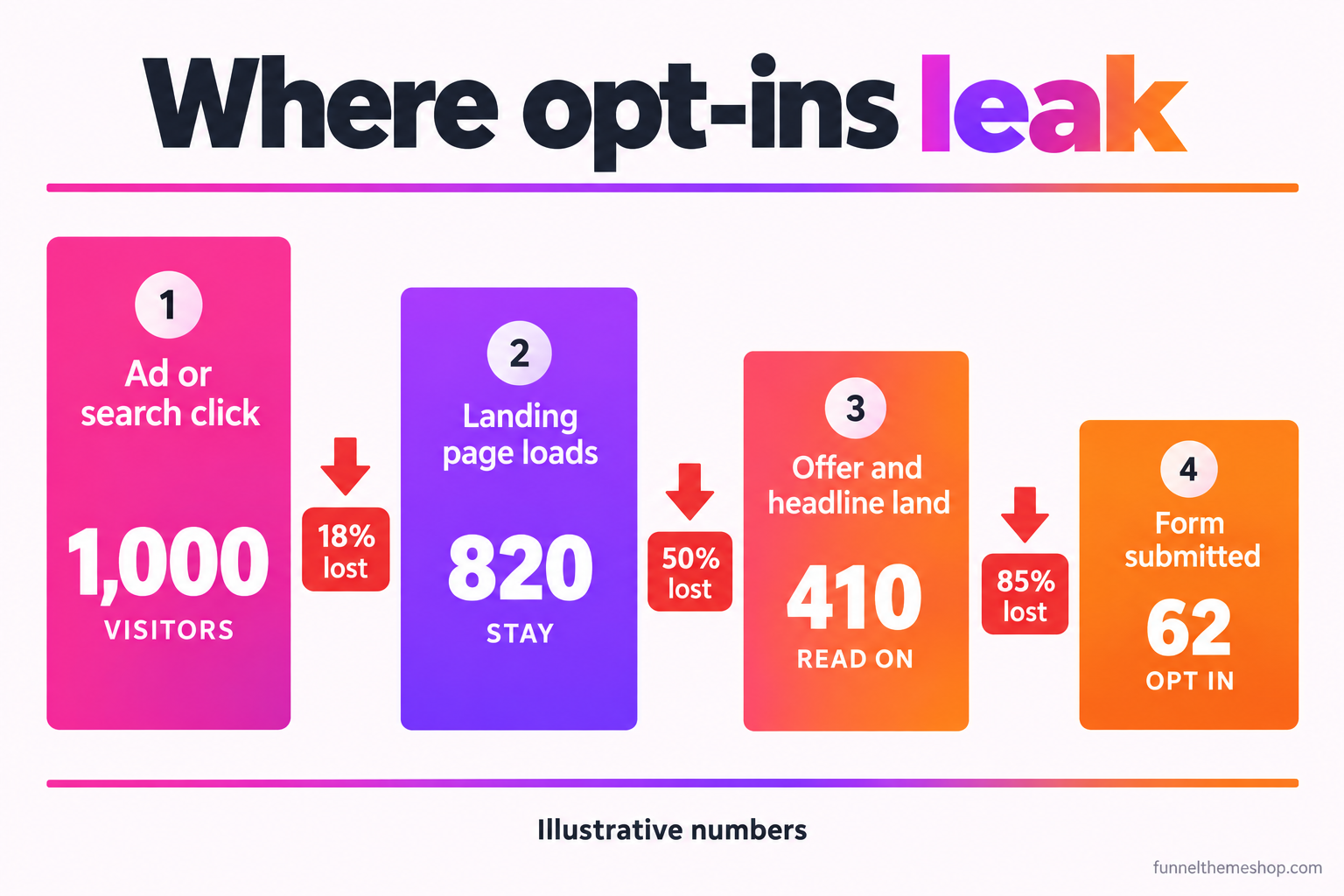
Notice what that shape does to your thinking. If eight in ten people leave before the offer even lands, rewriting your form button is a waste of an afternoon. The leak is upstream. The single most useful thing you can do with a funnel that will not convert is work out which link in the chain is failing, because the fix for a slow page is nothing like the fix for a weak offer, and treating them the same is how people burn a month.
That is also why "just redesign it" rarely works. A redesign changes everything at once, so when the number moves you learn nothing about why. You want to find the one broken link, fix that, and watch that one number. Everything below is written to help you do exactly that.
The traffic is almost never the problem, and the arithmetic proves it
Before we open the page up, sit with the maths for a second, because it settles the "I just need more traffic" argument before it starts. The Unbounce Conversion Benchmark Report, which looked at tens of millions of conversions across tens of thousands of landing pages, puts the median landing page conversion rate at 6.6% across all industries. Median means half of all pages do better than that. If your page is converting at one or two percent, you are not short of traffic. You are miles below the middle of the pack, and the gap is the page, not the ad account.
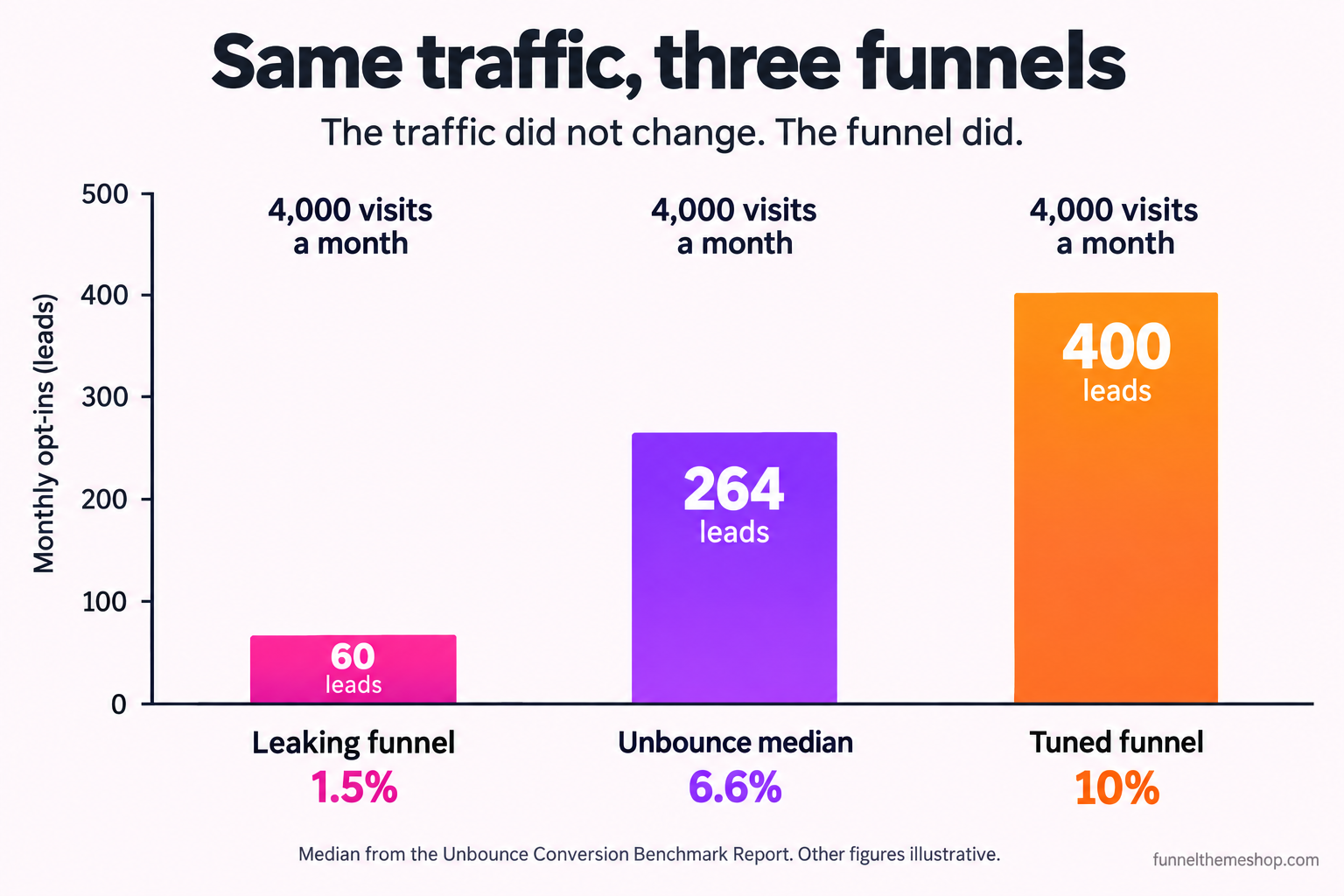
Run your own version. Say you get 4,000 visits a month, which is a modest local campaign. At a leaking 1.5% that is 60 leads. At the Unbounce median it is 264. At a tuned 10%, which is entirely reachable for a sharp single-offer page, it is 400. The traffic did not move a single click between those three. The funnel did all the work. Now put a rough dollar on it: if a lead is worth 30 dollars of booked work to you, the difference between the leaking page and the tuned one is over 10,000 dollars a month from traffic you are already paying for. The assumptions there are yours to change, but the direction never changes.
This is the whole reason to fix the leak first. More traffic multiplies whatever conversion rate you already have. Fixing the page raises the multiplier. One of those compounds and one of those just costs more.
The five leaks, in the order they usually cost you the most
Almost every "traffic but no opt-ins" funnel is losing people to one of these five, and they are listed in roughly the order of how much damage they do and how often they are the real culprit. Work down the list. The moment you find the one that matches your symptom, fix that and only that, then measure.
1. The ad and the page make different promises
This is the leak that empties the top of the bucket, and it is the most common one by a wide margin. The ad says "Free roof inspection this week." The visitor clicks, ready for a free roof inspection, and lands on a page headlined "Welcome to Ridgeline Home Solutions" with a paragraph about your company history and a general contact form. In the second it takes to read that, the promise they clicked on has vanished. They do not scroll to find it. They leave.
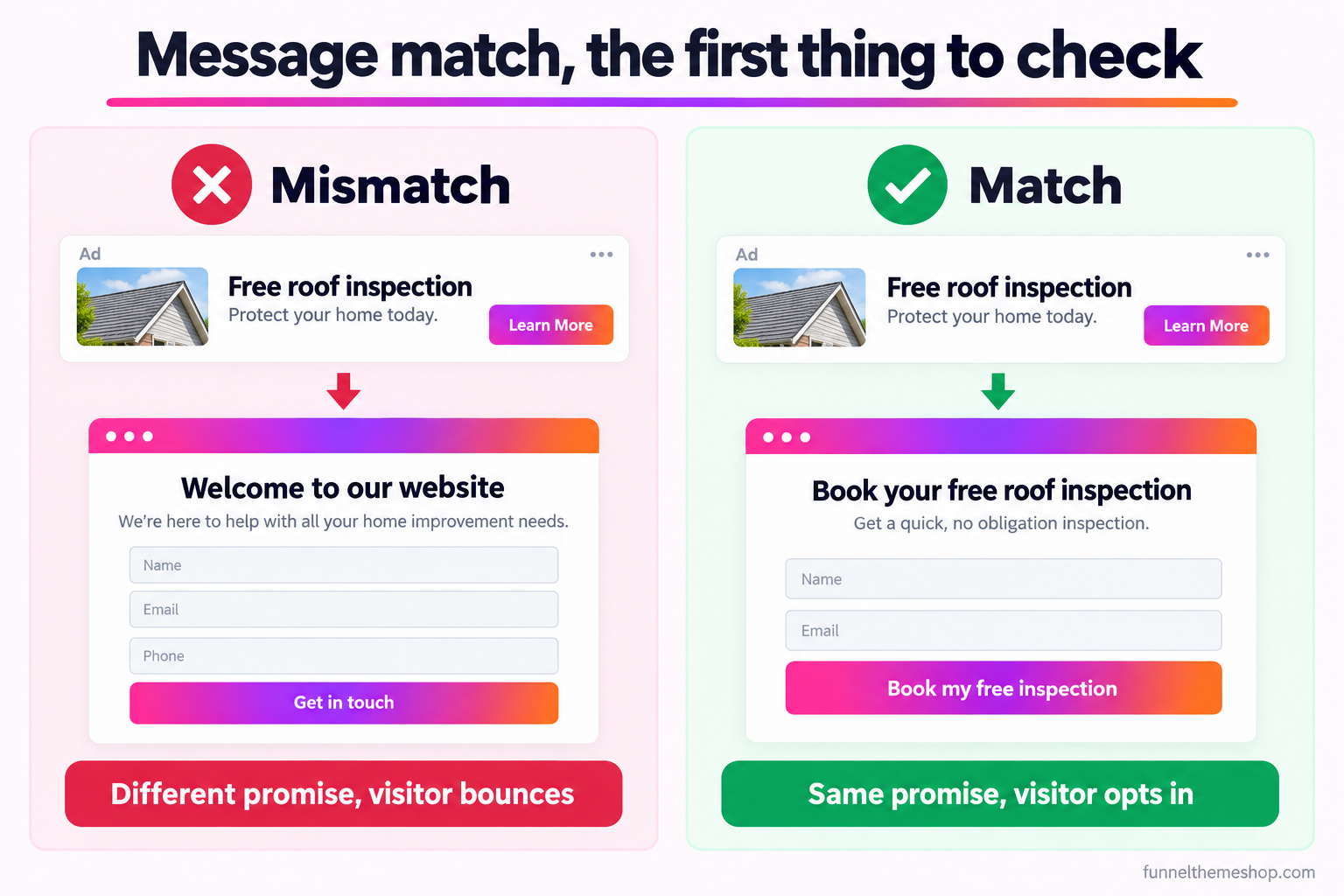
The symptom is a high bounce rate and a very short average time on page, often under ten seconds, on a page that gets plenty of clicks. The cause is that the headline above the form does not repeat the exact promise from the ad or the search term. The fix is free and it takes five minutes: make the page headline say back the thing the visitor just clicked on, in the same words. If the ad says "free roof inspection," the page says "book your free roof inspection," not "home improvement solutions." This is the first thing to check because it is the cheapest to fix and the most likely to be broken. The full anatomy of a page that holds a visitor is in the high converting landing page breakdown.
2. The form asks for more than the offer is worth
Every field on a form is a small price the visitor pays, and they are doing the sum whether they know it or not: is what I get worth what you are asking me to hand over. For a free guide, an email address is a fair trade and a phone number is not. For a free quote on a 12,000 dollar roof, a phone number is completely reasonable because the visitor understands you have to call them back. The mistake is charging a high price for a low-value offer, or asking for everything on the first step out of habit.
The symptom here is specific and it is the one people miss: the form gets seen but not submitted. In GoHighLevel you can watch this directly. If sessions reach the funnel step with the form and the form submission count is tiny, people are looking at your form and deciding it is not worth it. The cause is field count and field sensitivity out of line with the offer. The fix is to strip the form to the fewest fields the offer honestly needs, and if you genuinely need a lot of information, split it across steps so the visitor commits to the easy part first. A form that asks for a name and email to start, then asks the harder questions on step two, keeps more people than the same questions asked all at once.
One caution on the two-step form, because it has its own failure mode. If step one captures the contact and step two is where the qualifying questions live, make sure step one actually saves the contact before step two loads. Done right, you keep the lead even when they abandon the second step. Done wrong, you lose people on step two and never see the contact at all, which feels exactly like a form that does not work.
3. There is no offer, only a request
A "contact us" box is not an offer. "Get a free quote" is barely one. An offer is a specific, valuable, low-risk thing the visitor gets in exchange for their details, and if your page does not have one, no amount of headline polish will save it. People do not give their email to a business. They give it to get something. Take the something away and the form is just a request for a favour from a stranger.
The symptom is a page that looks perfectly professional and still converts near zero, where everyone who reviews it says "looks great" and nobody can tell you what the visitor actually gets. The cause is that the page is about the business, not about a trade the visitor wants to make. The fix is to build a real lead offer: a free inspection with a named outcome, a guide that solves one specific problem, a checklist, a price estimate, a first session. If you have never built one deliberately, the mechanics of a magnet that pulls the right people rather than everyone are in the lead magnet funnel guide. This is the leak that a redesign never fixes, because the problem is not how the page looks. It is that there is nothing on it worth an email.
4. The page is slow, or it breaks on a phone
Most of your traffic is on a phone, and a lot of funnels are quietly broken on one. A hero image that is three megabytes, a video that autoplays before anything else loads, a form field that the mobile keyboard covers so the visitor cannot see what they are typing, a button that sits below a section that will not scroll. You will never see any of this on your desktop preview, which is where most people build and check.
The device gap is real and it is large. Baymard Institute, which aggregates dozens of studies, puts the long-run average shopping-cart abandonment rate at 70.22% (baymard.com/lists/cart-abandonment-rate), and it does not fall evenly across devices: Dynamic Yield’s 2025 data has mobile abandonment at 80.02% against 66.41% on desktop. Those figures are for checkout rather than opt-in, but the lesson carries straight over: the phone is where funnels leak hardest, and it is the screen you are least likely to test properly.
The symptom is a conversion rate that looks acceptable on desktop and collapses on mobile when you segment by device, which you can do inside GoHighLevel reporting. The cause is weight, layout or a form control that fails on a small screen. The fix is to open the live page on an actual phone, on mobile data rather than your office wifi, and complete the form yourself with your thumbs. Compress every image, kill anything that autoplays, and make sure the submit button and the fields it needs are reachable without a fight. If the page takes more than a couple of seconds to become usable, that alone is costing you opt-ins before anyone reads a word.
5. The form submits and nothing happens
This is the cruel one, because the visitor did everything right. They matched, they read, they trusted you, they filled in the form and they pressed the button. And behind the scenes the workflow that was supposed to tag them, send the confirmation and start the sequence never fired. To your analytics it can even look like a success. To the visitor it looks like they shouted into a void, and to you it looks like the funnel does not convert, when in fact it converts fine and then drops the lead on the floor.
The symptom is form submissions that exist in the funnel stats but leads that never get the follow-up, or a contact count that does not match the submission count. The most common causes in GoHighLevel are a workflow left in draft after import, a trigger pointed at the wrong form, a required field that silently blocks the submit, or a notification email that is going to a sender address the account is not allowed to send from. Imported workflows in particular arrive in draft every time, so a funnel that worked in the demo can look completely dead the moment it lands in a new sub-account. The snapshot troubleshooting guide walks through the import-day version of this in detail.
The fix is to run a real end-to-end test with your own email and phone, then confirm four things in order: the contact was created, the correct tag was applied, the confirmation actually arrived, and the sequence started. If any of those four is missing, you have found your leak and it has nothing to do with the page at all.
The twenty-minute diagnosis, in order
Do not check these at random. Check them in the order the visitor meets them, top of the chain to the bottom, because a leak upstream makes everything downstream impossible to read. Here is the whole diagnosis as a table you can work down in one sitting.
| What you see | Most likely leak | First thing to check |
|---|---|---|
| Clicks are high, time on page is under ten seconds | Message mismatch (leak 1) | Does the page headline repeat the exact promise from the ad or search term |
| People reach the form step but do not submit | Form too heavy for the offer (leak 2) | Count the fields and ask if each one is worth it for what is offered |
| Page looks professional, everyone likes it, nobody converts | No real offer (leak 3) | Can a stranger say in one line what they get for their email |
| Desktop is fine, mobile is near zero when you segment | Broken or slow on mobile (leak 4) | Complete the form yourself on a real phone on mobile data |
| Submissions show in stats but no follow-up reaches leads | Workflow never fires (leak 5) | Run one live test and confirm contact, tag, email and sequence |
Two habits make this diagnosis trustworthy. First, change one thing at a time and give it enough traffic to read before you touch the next thing, or you will never know which change moved the number. Second, trust submissions over vanity metrics: a page can have a beautiful bounce rate and still capture nobody. If the leak is not obvious from the table, the problem is usually that you cannot see the steps clearly, and that is a measurement problem worth fixing on its own. Setting up conversion tracking that reports each funnel step turns this whole diagnosis from guesswork into reading a chart.
The three things you are already arguing back
"I just need more traffic"
You almost certainly do not, and the arithmetic above is why. More traffic into a leaking funnel produces more waste at the same rate, and you pay for every click of it. The only time "more traffic" is the honest answer is when your conversion rate is already healthy, at or above the median, and your volume is simply too low to produce the number of leads you need. If you are converting at one or two percent, traffic is the last lever to pull, not the first. Fix the rate, then scale the traffic into a funnel that keeps it.
"My offer is fine, it just needs a better design"
Sometimes true, usually not. Design fixes leaks one and four, message match and mobile, and those are real. But design cannot manufacture an offer that is not there, and it cannot make a form worth filling in when the trade is bad. If your page already looks clean and it still does not convert, the problem is almost never another round of polish. It is that the page is about you and not about a specific thing the visitor wants. That is a copy and offer problem wearing a design costume, and no new colour palette fixes it. The order to build the page in, offer first and decoration last, is laid out in the high converting funnel structure guide.
"Won’t a snapshot just fix all of this for me?"
Here is the honest answer, and it is not a straight yes. A good snapshot fixes the structural leaks for you, and those are most of them. The pages come already message-matched to the offer, the forms are already sized to the trade, the offer is already built into the funnel, the pages are already tested on a phone, and the workflows are wired so the submit actually fires. That removes four of the five leaks on the day you import it, which is exactly why people buy one instead of rebuilding the same mistakes by hand. What a snapshot cannot do is invent a compelling offer for a business that does not have one, or make a weak deal attractive. If your prices are wrong or your offer is genuinely worse than the person down the road, no funnel saves that. A snapshot gives you a proven structure to put a real offer into. It is not a substitute for having one. You can see how the offer-type funnels are organised on the lead generation category page.
Fix the leak before you buy another click
A funnel that gets traffic but no opt-ins is not a mystery and it is not bad luck. It is a chain with one weak link, and the link is findable in an afternoon if you walk the chain in order instead of throwing money at the top of it. Check the message match first, then the form, then the offer, then the phone, then the workflow. Change one thing, measure, move on. Most of the time the fix is free and it is upstream of everything you were about to spend money on.
If you would rather have someone walk the chain with you and hand back a list of exactly what is leaking and what to change, that is what a rescue audit is for. And if the diagnosis lands on "the structure is fixable but I do not want to rebuild it," a snapshot built for your trade arrives with those leaks already closed.
Frequently asked
Why does my GoHighLevel funnel get traffic but no opt-ins?
Almost always because of one specific leak rather than the traffic. The five common ones, in order, are a mismatch between the ad and the page headline, a form that asks for more than the offer is worth, no real offer at all, a page that breaks or loads slowly on mobile, and a form that submits but whose workflow never fires. Check them in that order.
Should I buy more traffic to fix a low opt-in rate?
No. More traffic into a funnel converting at one or two percent just produces more waste at the same rate, and you pay for every click. The Unbounce Conversion Benchmark Report puts the median landing page at 6.6%, so a page well below that has a page problem, not a traffic problem. Raise the conversion rate first, then scale traffic into a funnel that keeps it.
How do I know if the problem is my page or my offer?
Look at where people leave. If they bounce in the first few seconds, it is a message-match problem on the page. If they read, reach the form and do not submit, it is usually the form or the offer. If everyone says the page looks great and it still converts near zero, it is the offer: a stranger should be able to say in one line what they get for their email.
My form shows submissions but the leads never hear from me. What is wrong?
The page is converting and the follow-up is broken. In GoHighLevel the usual causes are a workflow left in draft after import, a trigger pointed at the wrong form, a required field blocking the submit, or a confirmation email sent from an address the account cannot send from. Run one live test and confirm the contact was created, the tag applied, the email arrived and the sequence started.
Can a snapshot fix a funnel that will not convert?
It fixes the structural leaks, which are most of them: message match, form sizing, a built-in offer, mobile testing and wired-up workflows all arrive done. What it cannot do is invent a compelling offer for a business that does not have one. A snapshot gives you a proven structure to put a real offer into; it is not a replacement for having one.
Related guides
More funnel guides
High-Converting Landing Page Anatomy: Every Block, Top to Bottom
A landing page is nine blocks doing nine jobs. Get the order right and the copy has somewhere to live. Get it wrong and you are decorating a page that argues with itself.
12 min readGuidesThe Lead Magnet Funnel: What to Offer, and What Happens Next
The download is the smallest part of a lead magnet funnel. What decides whether it works is what the offer promises and what happens in the ninety seconds after somebody claims it.
10 min readTroubleshootingGoHighLevel Snapshot Not Working? 11 Fixes That Cover 90% of Cases
Almost every "the snapshot is broken" ticket we receive is one of eleven things, and nine of them take under five minutes to fix.
8 min readFunnel snapshots · done-for-you builds
Pick a funnel, or hand us the offer
Buy the snapshot and it lands within 24 business hours as a share link and an installation PDF, add the $175 install if you would rather not do it yourself, or hand us the offer and we build the whole thing.
All sales final once the snapshot link is sent · free updates for life · one licence covers every sub-account you own