Troubleshooting
Your funnel converts on desktop and dies on mobile
Split the funnel report by device and the floor drops out. Desktop is fine, mobile is a graveyard, and two in three of your visitors are on a phone. This is how to find the leak.
It is Thursday and you have finally split the funnel report by device. You had been watching one conversion number for a month and it was fine, or fine enough to leave alone. Then you add the device breakdown and the floor drops out. Desktop is converting at just over four percent. Mobile is sitting under one. And when you check the traffic split, seven in every ten people who reach this funnel are on a phone.
So the number you had been quietly happy with was being propped up by the three in ten on a laptop. The majority of your visitors were arriving, glancing, and leaving, and the average hid it. This is the most expensive gap most funnel owners never look at, because the headline number looks survivable right up until you break it apart.
A mobile conversion problem is not one problem. It is a short list of specific, findable faults, each with its own symptom and its own fix. This guide walks the whole mobile chain in order, shows you where the drop-off hides, and gives you the diagnosis to run before you touch a single ad budget. If you want the full picture of how the pieces fit together first, the anatomy of the GoHighLevel funnel builder lays out the machine this all sits inside.
Some of the gap is normal. Most of yours is not
Here is the part that saves you from chasing ghosts. A gap between desktop and mobile conversion is normal and it is not your fault. Phones are where people browse in a queue, on the sofa, between two other things. Laptops are where people sit down to decide. So even a perfectly built funnel converts lower on mobile than on desktop, and knowing the size of that natural gap tells you whether you have a browsing pattern or a broken page.
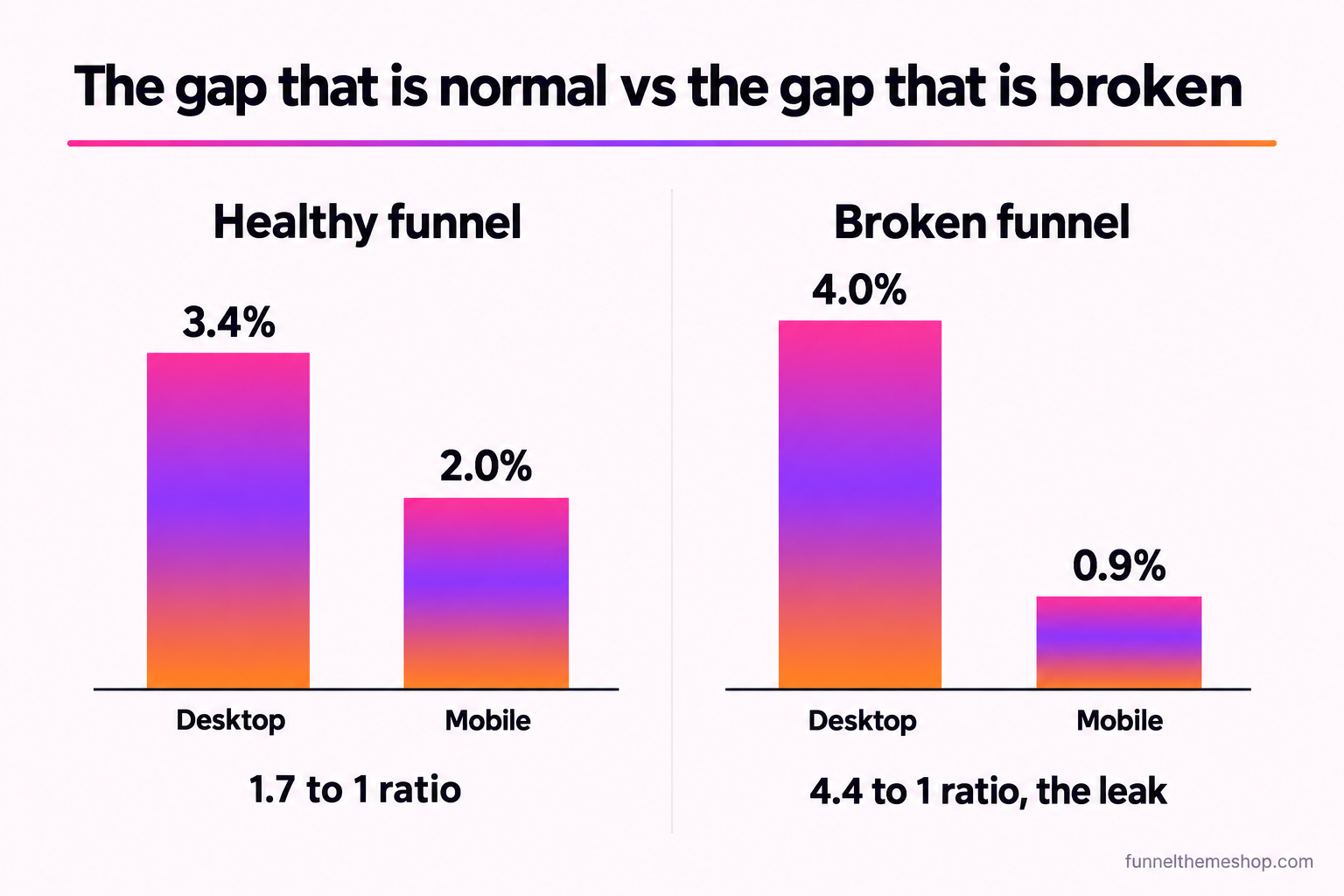
Contentsquare’s 2026 Digital Experience Benchmark, drawn from 99 billion sessions across more than 6,500 sites, puts desktop conversion at 3.4 percent against mobile web at roughly 2 percent, and in retail specifically at 3.81 percent on desktop versus 2.03 percent on mobile (contentsquare.com/guides/digital-experience-benchmark/conversions). The same report notes that desktop was only 30 percent of visits but delivered 47 percent of total time on site. People do their reading on a laptop and their scrolling on a phone. That is the shape of a healthy funnel.
Now hold that against your own numbers. A desktop-to-mobile ratio of roughly 1.7 to 1 is the benchmark. If your desktop converts at 4 percent and your mobile at 2.3 percent, you are inside the natural gap and your time is better spent elsewhere. If your desktop is at 4 percent and your mobile is under 1, your ratio is four or five to one, and that is not a browsing pattern. That is a page doing something to phone users that it does not do to laptop users, and it is fixable.
Why the majority of the funnel is on a phone
The reason this gap costs so much is the traffic split behind it. StatCounter put mobile at 64.35 percent of all global web traffic in July 2025, up from 60.61 percent at the start of 2024 (gs.statcounter.com). If you run paid social, the share is higher still, because Facebook and Instagram and TikTok are phone-first apps and the click opens in an in-app browser on a phone. So for most funnels the mobile visitor is not a minority to tidy up later. They are the audience, and desktop is the minority.
Put the two facts together and the arithmetic gets loud. Say your funnel takes 2,000 sessions a month and 70 percent of them are on a phone. That is 1,400 mobile sessions and 600 desktop. If desktop converts at 4 percent you collect 24 opt-ins from it. If your broken mobile converts at 0.9 percent, those 1,400 phone visitors, more than double the desktop traffic, hand you around 13 opt-ins. Lift mobile to a defensible 2.3 percent and the same phones give you about 32 opt-ins instead of 13. You did not buy a single extra click. You stopped throwing away the ones you already paid for.
Those session and rate figures are illustrative, chosen so the sum is easy to follow. Swap in your own from the device report. The point survives any reasonable numbers: when two in three visitors are on the device that converts worst, the mobile funnel is where your money is leaking, and it is the last place most people look.
Start with the device report, not the page
Before you change anything, find out where on the mobile journey people are leaving, because the fix for a slow first page is nothing like the fix for a broken form, and treating them the same wastes a week. You are looking for the step where the mobile line and the desktop line diverge.
In GoHighLevel, open the funnel and read the step-by-step stats, then segment by device where the report allows it. If it does not split cleanly, put the numbers side by side from your analytics. What you want is the conversion rate of each step for phones alone: how many mobile visitors saw the page, how many reached the form, how many submitted. If you have not trusted your funnel stats since the numbers stopped matching your CRM, fix that first with the walk-through in GoHighLevel conversion tracking, because a mobile diagnosis built on bad data sends you to the wrong page.
Read the drop-off like a map. If mobile visitors leave before the page even settles, your problem is speed or layout, and the form is irrelevant. If they reach the form in healthy numbers and then vanish, your problem is the form or the checkout. The step where the mobile line falls off a cliff is the one link in the chain you are going to fix. Everything below is a tour of the four places that link usually breaks, in the order a phone visitor meets them.
Leak one: the page is slow on a real phone on a real network
This is the biggest and the most invisible. You built the funnel on a laptop, on office wifi, with every image already cached in your browser. Your visitor is on a mid-range Android, on a patchy 4G signal, opening the page cold for the first time. Those are two completely different experiences of the same page, and the gap between them is measured in seconds you never feel.
Seconds are the whole game here. Think with Google’s mobile speed research found that as a page’s load time goes from one second to three, the probability that a visitor bounces rises by 32 percent, and that 53 percent of mobile visitors abandon a page that takes longer than three seconds to load (business.google.com/think). On a phone, the person has not committed to anything yet. A blank screen for three seconds is not a delay they wait out. It is a reason to swipe back to the feed they came from.
The measurable version of this is Core Web Vitals, Google’s three field metrics for real user experience. The thresholds for a good score, taken at the 75th percentile of real visits, are documented on web.dev: Largest Contentful Paint within 2.5 seconds, Interaction to Next Paint at 200 milliseconds or under, and Cumulative Layout Shift at 0.1 or below. They are not academic. The 2025 Web Almanac from HTTP Archive found that only 48 percent of mobile pages pass all three, against 56 percent on desktop, so more than half the mobile web is failing the test your funnel is being judged on.
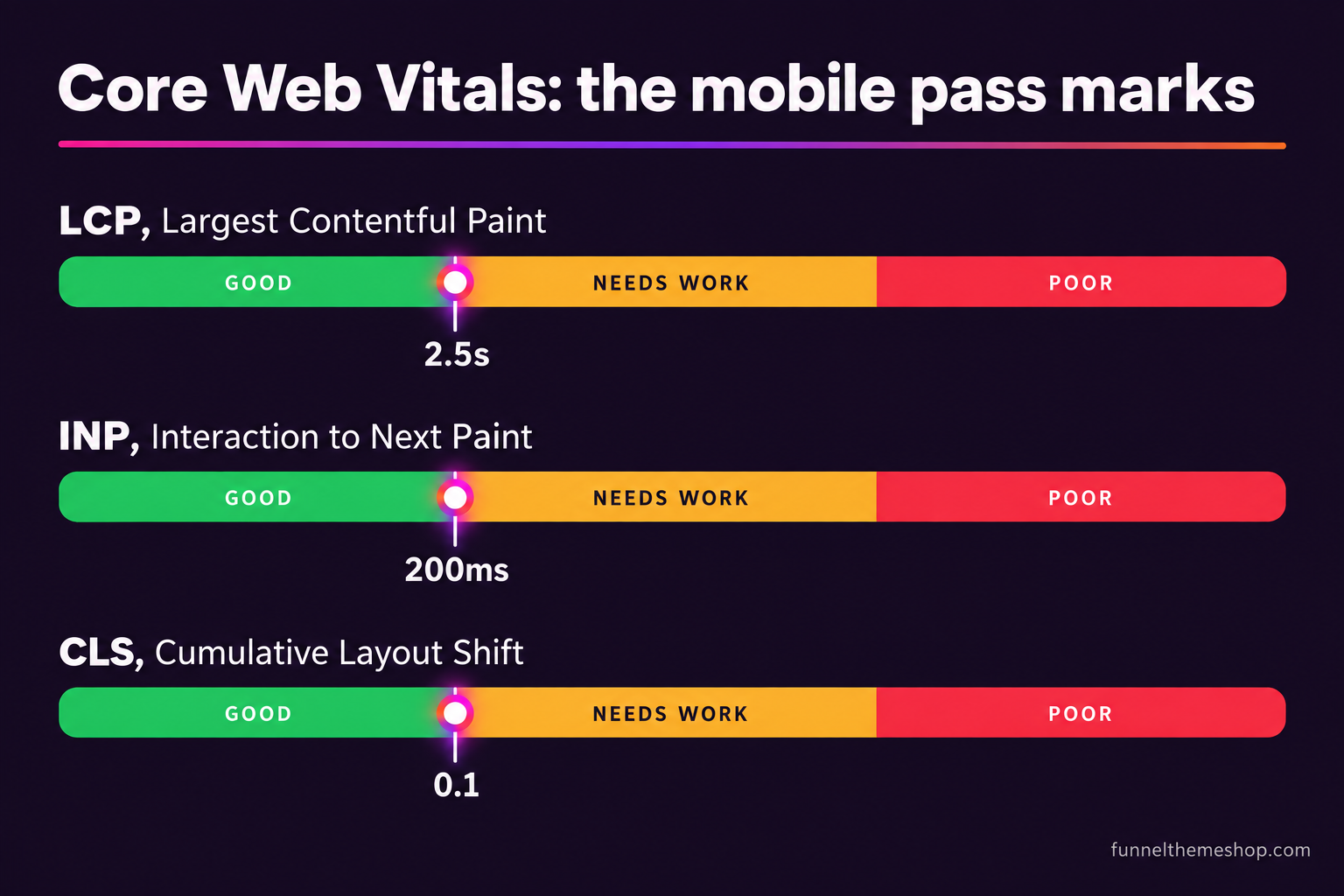
The symptom is a mobile bounce that spikes before the page is even scrolled. The cause is almost always a hero image that ships full desktop resolution to a phone, a font that blocks the first paint, or a stack of tracking scripts loading before the content. The fix is to test the live URL in Google PageSpeed Insights on the mobile tab, read the LCP and CLS it reports for real visitors, and cut the single heaviest thing first. A hero image compressed and sized for a phone screen is usually the biggest win available in ten minutes. A funnel built lean from the start avoids most of this, which is one of the quiet reasons a well-made snapshot converts on a phone where a page dragged in from a generic builder does not.
Leak two: the form is a thumb obstacle course
Assume the page loaded. The visitor read the headline, the offer landed, and they reached the form ready to give you their details. On a laptop this is a formality. On a phone it is where a startling number of ready buyers give up, because the form was designed for a mouse and a full keyboard and is being filled with one thumb on a bus.
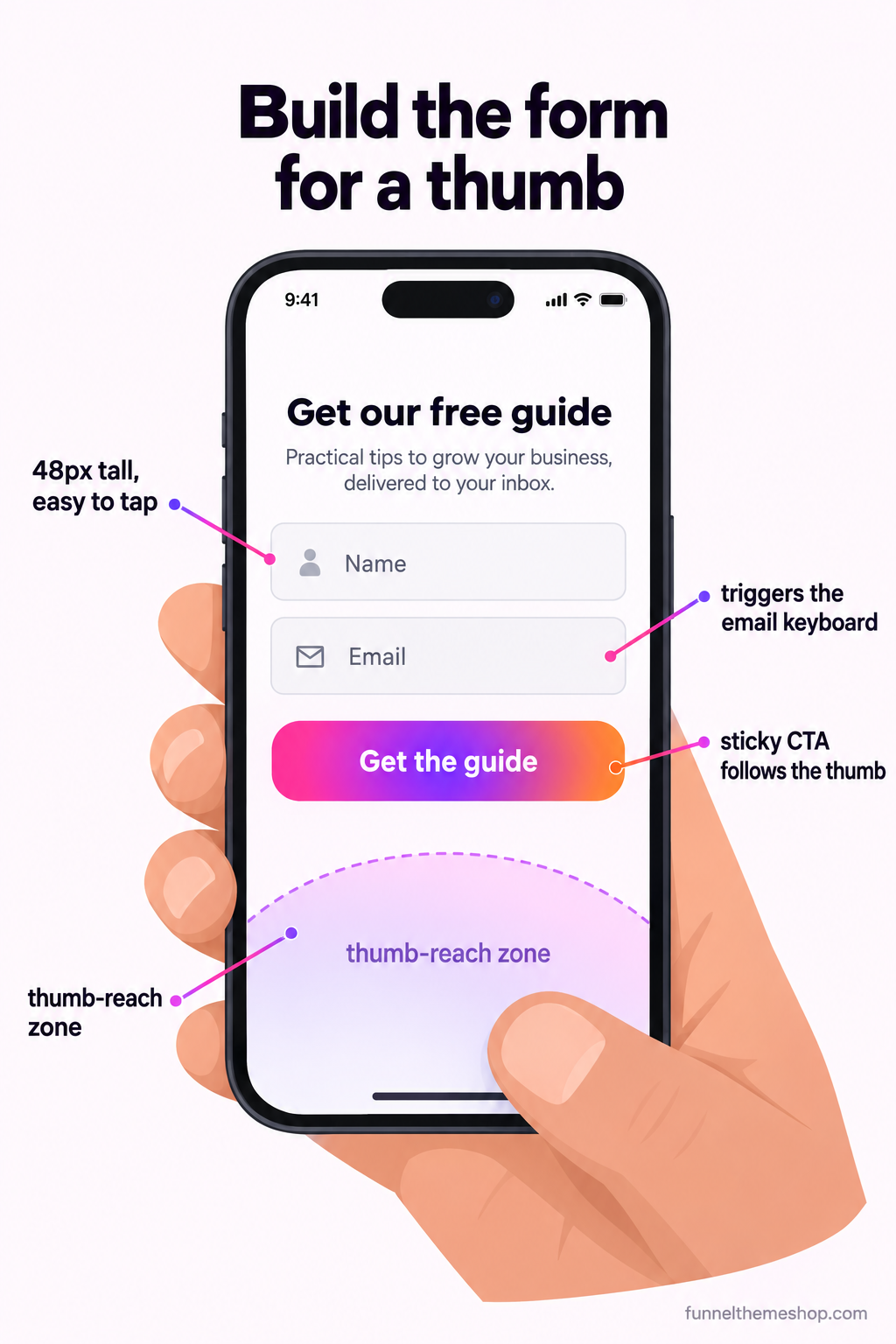
Walk your own form on a real phone and watch for the friction a mouse hides. Are the fields tall enough to tap without zooming? Google’s own guidance puts the minimum comfortable touch target around 44 to 48 pixels, and a lot of imported forms ship fields half that height. Does the email field bring up the email keyboard with the at symbol, or the plain alphabet keyboard that makes an address a chore? Does the phone field bring up the number pad? Does autofill work, or has a custom field name broken it so the browser cannot offer the details it already has? Every one of those is a tiny tax, and on a small screen tiny taxes compound into an abandoned form.
Then count the fields, because length hurts twice as much on mobile. Every field you ask for is another thing to type with a thumb and another moment to reconsider. A funnel that asks for name, email, phone, company, budget and a message on the first step is asking a phone user to do office work in a queue. Cut the first step to the fewest fields that let you follow up, usually name and one contact method, and push everything else to a second step or a later conversation. The full case for this, with the numbers on field count, is in the anatomy of a high-converting landing page.
Leak three: the offer is below three scrolls of hero
A hero section that looks generous on a wide monitor becomes a wall on a phone. A headline, a subhead, a large image, a badge row and a paragraph of intro can fill an entire phone screen and then some, which means the visitor has to scroll two or three times before they see anything they can act on. On desktop the same content sits comfortably beside the image and the call to action is visible without a single scroll. Same page, completely different first impression.
The symptom is a high scroll-away rate on mobile with almost no clicks on the primary button. People arrive, see a screen of branding, and leave before they reach the point. The cause is a layout that stacks vertically on a phone what sits horizontally on a desktop, pushing the action off the first screen. The fix is two-fold: tighten the mobile hero so the offer and the button are reachable within one short scroll, and add a sticky call-to-action bar that follows the thumb up the page so the next step is always one tap away wherever they have read to. This is the same discipline that runs through a high-converting funnel structure, applied to the screen most of your traffic is actually holding.
Leak four: the layout shifts and the checkout breaks
The last leak is the cruellest, because it catches the people who were ready to buy. Two faults live here, and both are mobile-specific.
The first is layout shift. That is the Cumulative Layout Shift metric from earlier made visible: an image or an ad or a late font loads after the page has drawn, everything below it jumps down, and the button the visitor was about to tap moves out from under their thumb at the exact moment they tap. They hit the wrong thing, get sent somewhere they did not mean to go, and the trust is gone. Google grades a good CLS at 0.1 or below for a reason. On a phone, a shifting page is not an annoyance, it is a mis-tap machine.
The second is the mobile checkout itself. On an order form, the phone visitor is entering card details with a thumb, and this is where friction turns straight into lost revenue. Baymard Institute’s running average across roughly 50 studies puts documented cart abandonment at 70.22 percent (baymard.com/lists/cart-abandonment-rate), and mobile is the harder end of that. If your order form does not offer the phone’s native wallet, does not trigger the number pad for the card field, or breaks the layout when the on-screen keyboard opens, you are adding friction to the one step where the visitor has already decided to pay. Make sure a one-click wallet is available, that any order bump is a single tap rather than a fiddly tick, and that the whole thing has been walked on a phone from empty field to receipt. If you are still choosing where the paid steps sit, order bump versus upsell covers which belongs before the payment and which belongs after, and on mobile that order matters more, not less.
The mobile diagnosis, in one table
Put the four leaks together and you have a diagnostic you can run in under half an hour on a real phone. Match your symptom to the row, confirm it with the tool named, and fix that one thing before you move to the next.
| Symptom on mobile | The likely leak | How to confirm it | The fix |
|---|---|---|---|
| Bounces before the page is scrolled | Slow load or heavy hero | PageSpeed Insights, mobile tab, read LCP | Compress and size the hero image for a phone; defer tracking scripts |
| Reaches the form, then leaves | Form built for a mouse | Walk the form on a real phone | Bigger tap targets, right keyboard per field, fewer fields on step one |
| High scroll-away, no button clicks | Offer sits below the hero | Scroll depth on mobile versus desktop | Tighten the mobile hero, add a sticky call-to-action bar |
| Taps the wrong thing, or drops at payment | Layout shift or broken checkout | PageSpeed CLS, then a live test purchase | Reserve image space, add a native wallet, test empty-to-receipt on a phone |
The order is deliberate. There is no point rewriting a form nobody reaches because the page never loads, and no point polishing a checkout when the offer is buried three scrolls up. Fix the earliest leak in the chain first, watch that one mobile number move, then go to the next. If you would rather see the whole diagnosis run against a funnel that gets clicks but no leads regardless of device, the traffic-but-no-opt-ins walk-through covers the desktop and offer side of the same chain.
Three objections worth answering
“Google indexes desktop, so my desktop is what matters”
The opposite is true, and it has been for years. Google runs mobile-first indexing, which means the mobile version of your page is the one it crawls, judges and ranks. The Core Web Vitals that feed into ranking are the mobile ones. So the slow, shifting phone experience is not a side issue that desktop rescues. It is the version Google is grading you on, and it is dragging the desktop rankings down with it.
“I looked at it on my phone and it was fine”
Your phone is the worst possible test device, and not because it is old. It is because the page is already in your browser cache, you are on wifi, you know exactly where the button is, and you are motivated to see it work. A first-time visitor on cellular data, opening cold from an ad, with none of your context, has a different experience entirely. Test the way they arrive: a fresh incognito window, cache cleared, network throttled to slow 4G in the browser dev tools, or simply PageSpeed Insights, which simulates a mid-range phone on a slow connection for you.
“A snapshot will not fix my mobile problem”
Sometimes that is exactly right, and it is worth saying plainly. If your leak is a weak offer or traffic that was never a fit, a new funnel changes nothing, and you should fix the offer before you spend on anything else. But if the leak is structural, a hero built to stack badly on a phone, a form dragged in from a desktop-era template, a checkout that was never walked on mobile, then starting from a funnel that was built mobile-first is genuinely faster than un-breaking the one you have. That is the case where a purpose-built snapshot earns its price, and the case where it does not is one we will tell you about on the call.
Whichever leak you find, the sequence is the same. Split by device, find the step where mobile falls off, fix the earliest break in the chain, and re-measure on a real phone. Most funnels that die on mobile are not badly written. They were built and tested on the one device that hides every fault, and the fix is to start judging them on the device two in three of your visitors are actually holding.
Frequently asked
Why does my GoHighLevel funnel convert on desktop but not on mobile?
Almost always one of four things: the page loads too slowly on a real phone on a cellular network, the form is built for a mouse and hard to complete with a thumb, the offer and button sit below two or three scrolls of hero, or the layout shifts as it loads and the checkout breaks. Split your funnel report by device to find the step where mobile drops off, then fix that one link first.
What is a normal gap between desktop and mobile conversion?
Some gap is expected because phones are for browsing and laptops are for deciding. Contentsquare’s 2026 benchmark puts desktop at about 3.4 percent and mobile web at roughly 2 percent, a ratio near 1.7 to 1. If your desktop-to-mobile ratio is past three to one, that is not a browsing pattern, it is a fault on the page you can find and fix.
How do I test my funnel the way a mobile visitor actually sees it?
Do not use your own phone, because the page is cached, you are on wifi and you know where the button is. Open a fresh incognito window with the cache cleared and the network throttled to slow 4G in the browser dev tools, or run the live URL through Google PageSpeed Insights on the mobile tab, which simulates a mid-range phone on a slow connection and reports your real Core Web Vitals.
Which Core Web Vitals numbers should my funnel hit on mobile?
For a good score at the 75th percentile of real visits, Largest Contentful Paint should be within 2.5 seconds, Interaction to Next Paint at 200 milliseconds or under, and Cumulative Layout Shift at 0.1 or below. The 2025 Web Almanac found only about 48 percent of mobile pages pass all three, so hitting them is a real advantage.
Will buying a funnel snapshot fix a mobile conversion problem?
It depends on the leak. If the problem is a weak offer or poorly matched traffic, a new funnel will not help and you should fix that first. If the problem is structural, a hero that stacks badly on a phone or a form and checkout never built for mobile, then starting from a funnel built mobile-first is faster than un-breaking the one you have. Book the free call and we will tell you honestly which case you are in.
Related guides
More funnel guides
High-Converting Landing Page Anatomy: Every Block, Top to Bottom
A landing page is nine blocks doing nine jobs. Get the order right and the copy has somewhere to live. Get it wrong and you are decorating a page that argues with itself.
12 min readTroubleshootingGoHighLevel Funnel Gets Traffic But No Opt-Ins? The Fix
The analytics show 600 sessions and four opt-ins. Everyone reaches for more traffic. The traffic is almost never the problem, and this is how to find the one that is.
12 min readGuidesGoHighLevel Conversion Tracking: Pixels, GA4, UTMs and Attribution
The funnel tells you where people dropped out. It does not tell you which ad paid for them. Closing that gap is a specific piece of plumbing, and most GHL accounts do not have it.
12 min readFunnel snapshots · done-for-you builds
Pick a funnel, or hand us the offer
Buy the snapshot and it lands within 24 business hours as a share link and an installation PDF, add the $175 install if you would rather not do it yourself, or hand us the offer and we build the whole thing.
All sales final once the snapshot link is sent · free updates for life · one licence covers every sub-account you own