Troubleshooting
Your GoHighLevel form submits, but the workflow never fires
The capture works. The contact list grows. And nobody ever hears back. A form that submits but never fires the automation is a leak hiding behind a green number, and this is how to find it.
It's a Tuesday and the funnel stats look fine. Eighteen form submissions this week. The contact list grew by eighteen. By every number on the dashboard, the funnel is working. Then a customer you know personally, the one who filled in the form on Sunday because you asked them to test it, sends you a message asking why nobody got back to them. No confirmation email. No text. No call. You check your own phone and there's no "new lead" notification either. The form captured them perfectly and then dropped them into silence.
This is the cruellest failure a funnel has, because it hides behind a green number. A page that gets no opt-ins at least tells you something is wrong. A page that captures the lead and then fires nothing looks like success right up until you notice the phone has been quiet for a week. The money was already spent to win the click and earn the submit. The only thing that failed is the part that was supposed to turn a row in a database into a conversation.
If people aren't even submitting the form, that's a different problem with a different fix, and the page-by-page version of it lives in why your funnel gets traffic but no opt-ins. This guide starts one step later, at the moment the submit succeeds. We'll walk the exact chain GoHighLevel runs between a form submission and the first automated touch, show you the handful of places it breaks, and give you a fifteen-minute test that finds the broken link without guessing. For the wider picture of how all these pieces sit together, the anatomy of the GoHighLevel funnel builder lays out the whole machine this problem lives inside.
The capture and the automation are two different machines
Here's the thing almost nobody is told when they start with GoHighLevel. A form submission and a workflow firing are two separate events, and they're wired together on purpose rather than welded. When someone submits, GoHighLevel creates or updates a contact. That is the capture, and it almost never fails. Separately, a workflow is supposed to notice that submission, enrol the contact, and start running actions. That is the automation, and it fails in ways the capture never will.
They're deliberately decoupled so you can rebuild a funnel, import a snapshot, or edit a sequence without accidentally texting every contact in the account. The cost of that safety is exactly the symptom you're staring at: the contact can land cleanly while the automation does nothing, and no error is thrown anywhere a normal person would look. The form says thank you. The dashboard ticks up. The machine that was meant to reach the human never started.
So the question is never "is my form broken". The form is fine. The question is "which link between the submit and the first touch is the one that isn't connected", and there are only about six candidates. Once you can see the chain, you can walk it.
The chain from submit to first touch
Picture the whole path as a line of dominoes. A submission has to knock over every one of them to reach the lead. Miss any single domino and everything downstream of it stands still, which is why the symptom is so total: you don't get a late email or half a sequence, you get nothing.
- The submit lands. The form or survey writes a contact. This is the capture, and it's the one part that reliably works.
- A trigger evaluates. Every live workflow has one or more triggers watching for events. One of them has to be a form or survey trigger pointed at this specific form.
- The trigger's filters are checked. A trigger can carry conditions, and the contact has to satisfy all of them or the trigger passes them by in silence.
- The contact is enrolled. The workflow adds the contact, subject to its re-entry setting, which decides whether someone who has been through before can enter again.
- The actions run in order. Tag, send email, send SMS, notify you, create an opportunity, wait, branch. They fire top to bottom.
- Each action clears its own prerequisite. The email needs a verified sending domain. The text needs A2P registration. The internal notification needs a real recipient. The booking step needs a connected calendar.
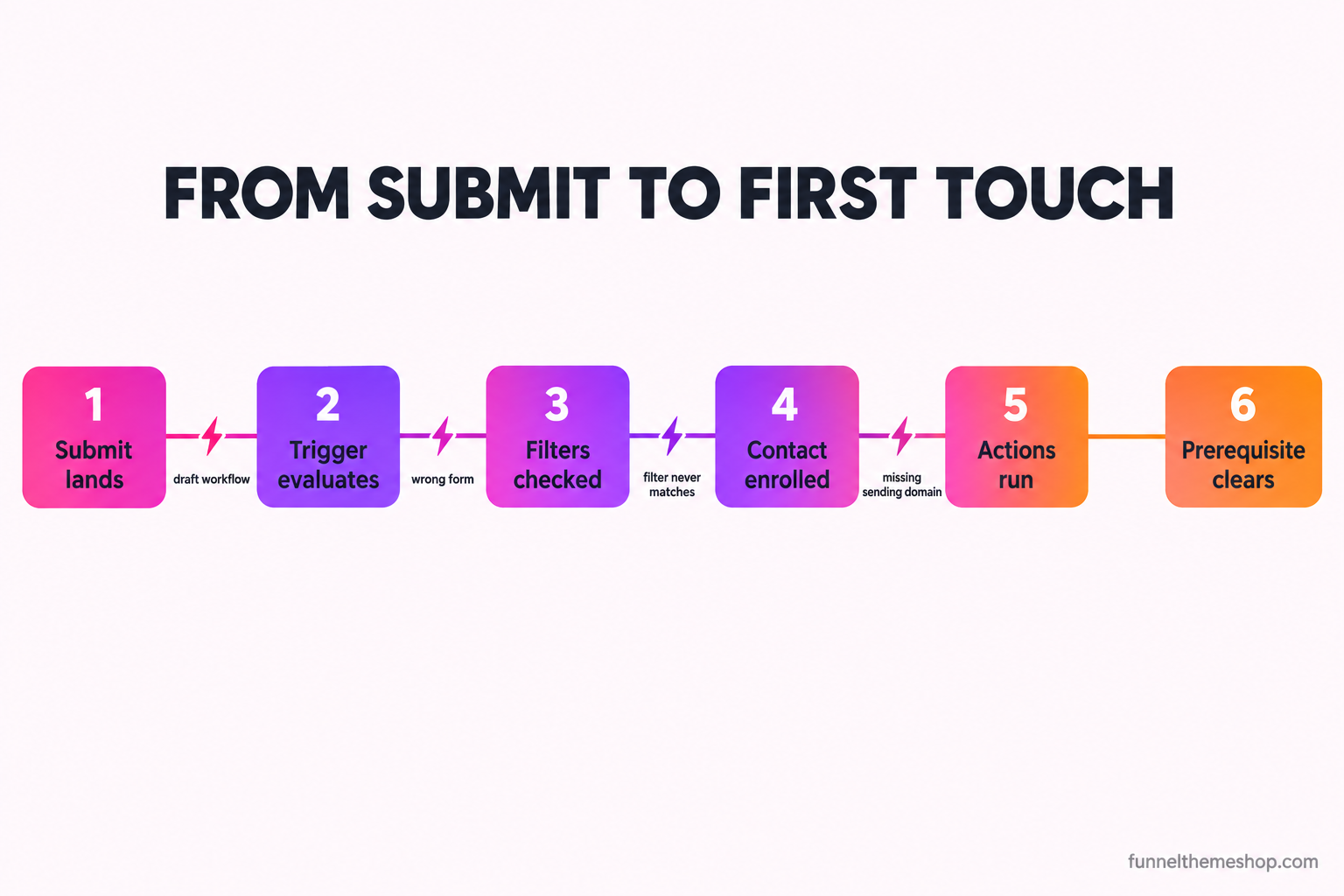
Read that chain once more, because it reorganises your thinking. The failure is almost never "the workflow is wrong". It's one domino in a line of six, and the fix for a draft workflow is nothing like the fix for a text that A2P is blocking. Find the specific domino, fix that one, and run a single test. Rebuilding the workflow from scratch, which is what most people do out of frustration, changes every domino at once and teaches you nothing about which one was down.
The six ways it breaks, in the order you should check them
These are listed roughly by how often they're the real culprit and how fast they are to rule out. Work down the list. The moment the symptom matches, stop and fix that one.
1. The workflow is still in draft
This is the single most common cause, and it's almost always the answer when a funnel that worked in a demo goes dead the day it lands in a new sub-account. Imported workflows arrive in draft every time, without exception. A workflow in draft is visible, editable, and completely inert. It will not enrol anyone no matter how perfect the trigger is. The symptom is total silence from a workflow that looks finished. The fix takes ten seconds: open it, find the Draft toggle at the top, flip it to Publish. Then check every other workflow in the account, because if one came in as draft they all did.
2. The trigger is pointed at the wrong form, or at no form
A workflow can be published, live, and watching for the wrong thing. The classic version is a trigger set to "Form Submitted" with the form filter left on its default, or pointed at a form you duplicated and then stopped using while the funnel now shows a different copy. GoHighLevel will happily let a trigger watch form B while your funnel serves form A. The symptom is submissions climbing in the funnel stats while the workflow's enrolment history stays empty. The fix is to open the trigger, confirm the form or survey name matches the one actually embedded on the live funnel step, and save. If you rebuilt the page recently, check the embed is the current form and not a stale one from a previous version.
3. The trigger has a filter that never matches
Triggers can carry conditions, and a condition that can't be met is a quiet off switch. A trigger that only fires when a field equals a value the form never collects, or when the contact carries a tag that doesn't get applied until later in the same workflow, will sit there forever waiting for a state that never arrives. The symptom is a trigger that's clearly correct at a glance but still enrols nobody. The fix is to strip the trigger back to the bare event, run a test, confirm it fires, then add filters back one at a time until you find the one that was impossible. Most of the time the honest answer is that the filter wasn't needed at all.
4. Re-entry is off and you keep testing with yourself
This one fools people into thinking the fix they just made didn't work. A workflow's re-entry setting decides whether a contact who has already been through can enter again. With re-entry off, which is the default, your own test contact goes through once and is then permanently ineligible. You submit again, see nothing happen, and conclude the workflow is still broken when in fact it ran perfectly the first time and is now correctly refusing to run you twice. The symptom is a workflow that fires once and then appears dead. The fix is to test with a fresh email and phone number every single time, or to delete your test contact between runs, which also keeps your stats honest.
5. The action fires but its prerequisite is missing
Sometimes the workflow enrols the contact correctly and you can see it in the history, but the thing you were watching for, the email or the text, still never arrives. Now the trigger is fine and the problem has moved to a single action. An email step needs a verified sending domain connected to the sub-account, or it either fails or lands in spam. A text step needs the number registered through A2P 10DLC, and until that clears the message silently does not send, which is a whole separate rabbit hole covered in the A2P 10DLC guide. An internal "notify me" step needs a real, monitored recipient and not a placeholder address left over from the snapshot. The symptom is a workflow history that shows the contact moving through while the real-world message never shows up. The fix is to open the specific action, check its prerequisite, and send one test through it in isolation.
6. The contact exits early on a branch, or two workflows collide
The last one is logic. An if/else branch or a wait-until condition can route your test contact down a path with no actions on it, so the workflow technically runs and technically does nothing visible. Or you published more than one workflow after an import and a contact is landing in two at once, getting conflicting instructions or being removed from one by the other. The symptom is inconsistent behaviour: some contacts get the follow-up, some don't, and you can't see the pattern. The fix is to open the enrolment history for a contact that failed, read the path it actually took step by step, and find the branch that dead-ended or the second workflow that intercepted it. GoHighLevel records every step a contact takes, so this is detective work with a full case file, not guesswork.
The fifteen-minute diagnosis
You don't need to understand all six at once. You need to run one real submission and watch what it does. Here is the test, in order, and it takes about fifteen minutes.
- Submit the live funnel form yourself, on the real published URL, with an email address and a phone number you can actually check. Not a fake one, a real inbox and a real handset.
- Open the contact that was just created. Confirm it exists and that the fields you expect came through. If the contact isn't there, the problem is upstream at the form itself, and you're on the wrong guide.
- Look at the contact's workflow enrolment on its own timeline. Did any workflow enrol it? If nothing enrolled, you're on cause one, two, three, or four, so check draft state first, then the trigger's form, then its filters, then re-entry.
- If a workflow did enrol it, read the action history step by step. Find the step that was supposed to email, text, or notify, and see whether GoHighLevel marks it as run.
- If the step ran but the message never arrived, you're on cause five, so go to that action and check its prerequisite in isolation: sending domain for email, A2P status for text, recipient address for the notification.
- If the contact dead-ended on a branch or landed in a second workflow, you're on cause six, so follow the recorded path and find where the logic sent it.
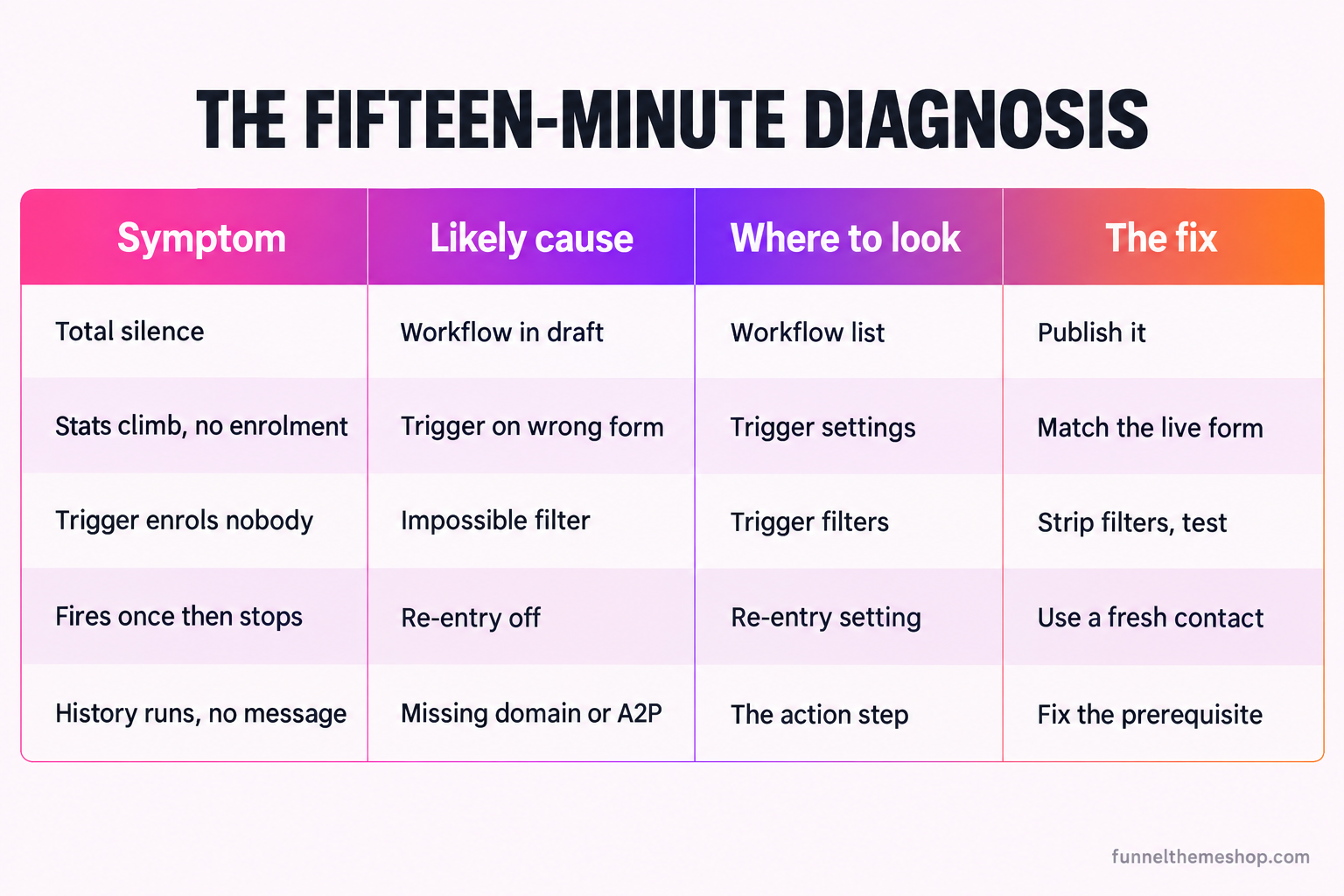
The reason this test works is that it turns an invisible problem into a visible one. The enrolment history is the single most underused screen in GoHighLevel. It records, for every contact, exactly which workflows touched them and what each step did. You are not guessing which domino is down. You are reading the record of the fall.
| Symptom | Most likely cause | The fix |
|---|---|---|
| Total silence from a workflow that looks finished | Workflow still in draft (cause 1) | Flip the Draft toggle to Publish, then check every other workflow |
| Submissions climb in stats but enrolment history is empty | Trigger pointed at the wrong form (cause 2) | Match the trigger form to the one embedded on the live step |
| Trigger looks correct but enrols nobody | A filter that can never be satisfied (cause 3) | Strip to the bare event, test, add filters back one at a time |
| Workflow fires once then appears dead on retest | Re-entry off and you are testing with yourself (cause 4) | Use a fresh email and phone each time, or delete the test contact |
| Contact moves through history but no message arrives | An action prerequisite is missing (cause 5) | Check the sending domain, A2P status, or notification recipient |
| Some contacts get follow-up, some do not | A dead-end branch or a second workflow colliding (cause 6) | Read the enrolled contact path and find where logic diverts it |
What a dead automation actually costs
It's tempting to file this under "annoying but harmless" because the leads are, after all, still sitting in the contact list. You can always call them later. That instinct is the expensive one, and the research on it is blunt. The speed you reach a new lead is one of the largest levers in the whole funnel, and a silently dead "new lead" workflow doesn't delay the first touch by an hour, it removes it entirely until a human happens to notice.
Harvard Business Review's audit of online sales leads, "The Short Life of Online Sales Leads", measured response times at 2,241 United States companies and found that firms which made contact within the first hour were around seven times more likely to have a qualifying conversation than those that waited even sixty minutes longer, and more than sixty times more likely than those that waited twenty-four hours or more (hbr.org/2011/03/the-short-life-of-online-sales-leads). Twenty-three percent of the companies in that audit never responded at all. The Lead Response Management study behind the well-known five-minute rule, the MIT and InsideSales research, puts it even sharper: contacting a lead within five minutes rather than thirty raised the odds of qualifying them by twenty-one times (leadresponsemanagement.org). Both figures were confirmed from published summaries while writing this, rather than pulled from the primary PDFs.
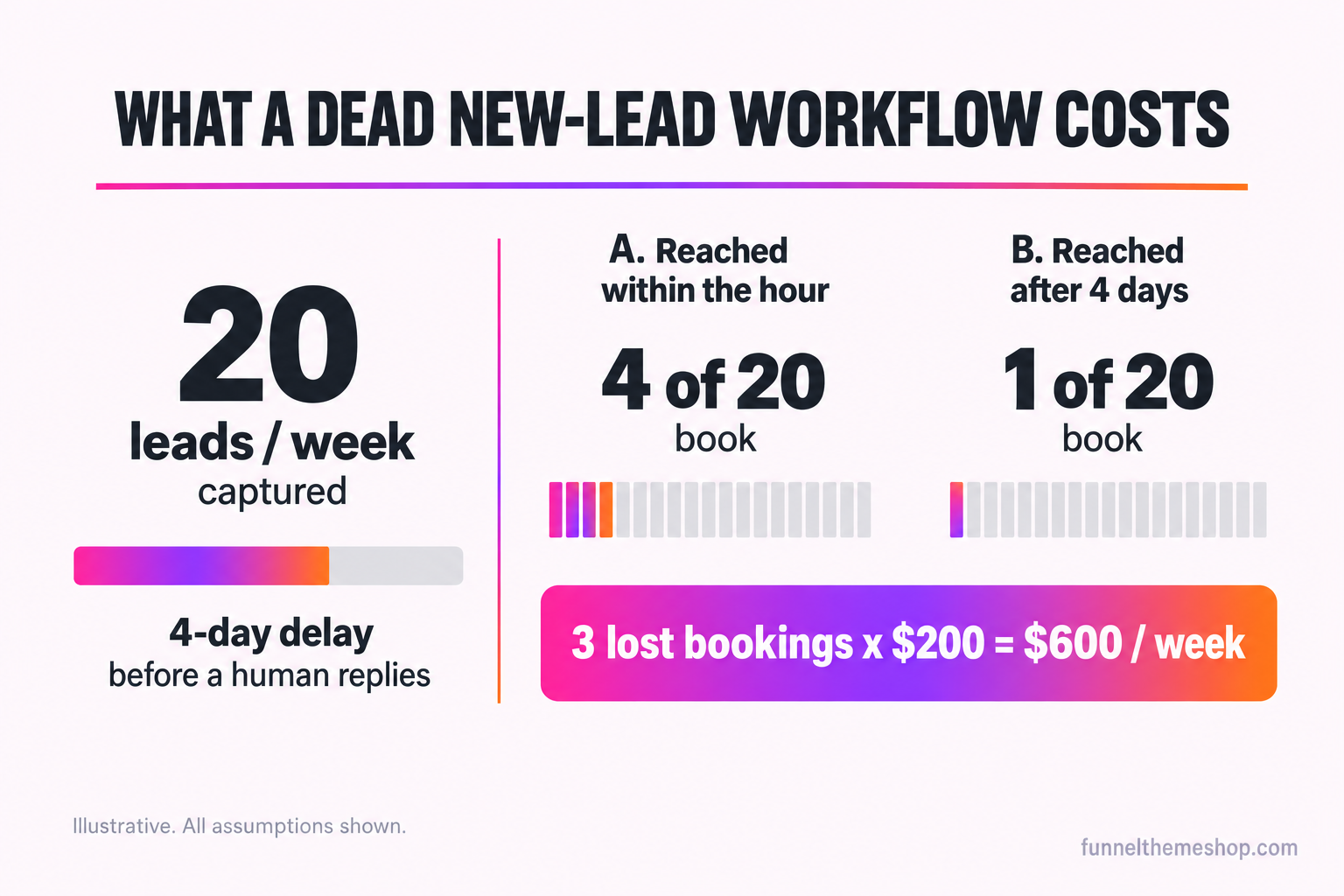
Now put your own arithmetic on it, with the assumptions visible so you can argue with them. Say your funnel captures twenty leads a week and your dead workflow means none of them gets an automatic first touch, so they wait until you work the list by hand, which on a busy week is Thursday. That's up to four days of delay on twenty leads. If one in five of those leads would have booked when reached inside the hour, and only one in twenty books after a four-day wait because three competitors replied first, you have quietly turned four bookings a week into one. Put a modest two hundred dollars of booked work on each and the broken automation is costing six hundred dollars a week, every week, from traffic and ad spend you already paid for. Change the numbers to match your business. The direction never changes.
Three things you are probably arguing back
Objection one: "it worked last week, so the funnel is fine and this is a fluke". Automations don't usually break by going wrong, they break because something underneath them changed. A sending domain expired or got disconnected. The A2P registration lapsed or was never finished. Someone duplicated the funnel to make an edit and the live page now serves a form the trigger isn't watching. A workflow that ran perfectly in September can be stone dead in October without a single line of it being touched, because the thing it depended on moved. "It worked before" is a reason to check what changed, not a reason to assume it's still working.
Objection two: "I'll just check the contact list every morning and reach out by hand". You can, and for a trickle of leads that's a reasonable stopgap for a day or two. But read the speed-to-lead numbers again. A manual morning sweep means a lead who submitted at 9am Monday hears from you at 9am Tuesday, which the research says is the window where qualification odds have already collapsed. It also means nothing happens on evenings, weekends, or the week you're on holiday, which is precisely when a lot of service funnels do their capturing. Manual follow-up isn't a fix for a dead automation. It's a person doing badly what the automation was built to do instantly.
Objection three, and this is the honest one: "a snapshot would just fix all of this for me". Partly. A well-built snapshot ships the funnel, the workflows, and consent-ready forms already wired together, so the machine is assembled and the triggers are pointed at the right forms out of the box. What a snapshot cannot do is connect your sending domain, register your number through A2P under your own legal entity, or monitor a notification address for you, because those are tied to your account and nobody else's. That's the exact gap the optional $175 installation add-on and the fuller snapshot install and customisation service exist to close. And if the real problem turns out to be that the funnel logic itself is wrong, that the sequence is reaching people at the wrong moment with the wrong message, no amount of trigger-fixing helps and you want how a high converting funnel is actually structured instead. A snapshot is a funnel, not a substitute for setting up your own account.
A pre-launch check so it never happens again
Most dead-automation emergencies are launch-day problems that simply weren't caught, because the funnel was pushed live without a single real submission run through it end to end. Before you send one dollar of traffic to any funnel, old or new, imported or built, walk this list.
- Publish every workflow you want live, deliberately, and confirm none that matters is sitting in draft.
- Open each trigger and confirm it names the exact form or survey embedded on the live funnel step, not a duplicate.
- Strip any trigger filter you cannot justify out loud, and test the ones you keep.
- Connect and verify the sending domain before the first email step ever needs to run.
- Finish A2P 10DLC registration before you rely on a single text, because it is the slowest thing to clear and the easiest to forget.
- Point every internal notification at a real inbox or number you actually watch.
- Submit one live test with a real email and phone, walk the whole chain, confirm the contact, the tag, the email, the text and the notification all land, then delete the test contact so your first genuine conversion is genuinely your first.
That last step is the whole game. A funnel is not live when the page loads. It's live when one real person can travel the entire chain from submit to first touch and come out the other side with a message in their hand. If you can confirm that once, by hand, before launch, you will almost never meet the silent Tuesday this guide is about. If you have already met it and the test above hasn't surfaced the broken domino, that's exactly what the rescue audit is for.
One last reframe before you go fix it. If your dashboard and your inbox disagree, the dashboard is not lying, it is answering a narrower question than you think. It counts captures. It says nothing about whether anyone was reached. The gap between those two numbers is the whole subject of how to track what your funnel is really doing, and closing it is what turns a list of contacts back into a list of conversations.
Frequently asked
Why does my GoHighLevel form create a contact but not send the confirmation email?
Because the capture and the automation are separate. Creating the contact is the form doing its job; sending the email is a workflow that has to be triggered and allowed to run. The usual causes are a workflow left in draft after an import, a trigger pointed at a different form, or an email step whose sending domain is not verified on the sub-account. Submit one real test, open the new contact, and read its workflow enrolment history to see which of those it is.
My GoHighLevel workflow worked last week and stopped firing this week. What changed?
Automations rarely break on their own; something underneath them usually moved. Check whether the sending domain disconnected, the A2P registration lapsed, or someone duplicated the funnel so the live page now serves a form the trigger is not watching. A workflow can be untouched and still go dead because the thing it depended on changed.
How do I test a GoHighLevel workflow without wrecking my conversion stats?
Use a fresh email address and phone number for each test so re-entry rules do not block you, run the live published funnel rather than a preview, watch the new contact move through its enrolment history, then delete the test contact when you are done. Deleting it keeps your submission and conversion counts honest so your first real lead is genuinely counted as the first.
Does buying a funnel snapshot mean the automations will just work?
The machine arrives assembled: the funnel, the workflows and the forms are wired together and the triggers are pointed at the right forms. What a snapshot cannot do is connect your sending domain, register your number for A2P under your legal entity, or monitor your notification address, because those belong to your account. The optional installation add-on exists to set exactly those up when you would rather not.
Where in GoHighLevel can I see why a workflow did not fire?
Open the individual contact and look at its workflow enrolment on the timeline, and open the workflow itself to read its enrolment history. Between them they record every contact that entered, every step that ran, and the path each contact took through any branches, which turns an invisible failure into something you can read directly.
Related guides
More funnel guides
GoHighLevel Funnel Gets Traffic But No Opt-Ins? The Fix
The analytics show 600 sessions and four opt-ins. Everyone reaches for more traffic. The traffic is almost never the problem, and this is how to find the one that is.
12 min readGuidesGoHighLevel Conversion Tracking: Pixels, GA4, UTMs and Attribution
The funnel tells you where people dropped out. It does not tell you which ad paid for them. Closing that gap is a specific piece of plumbing, and most GHL accounts do not have it.
12 min readGuidesA2P 10DLC for GoHighLevel: Why Your Funnel Captures Leads but the Texts Never Send
The form works. The lead arrives. The confirmation email lands. The text that was supposed to book the appointment never shows up, and nobody gets an error. This is almost always A2P 10DLC, and it is fixable.
13 min readFunnel snapshots · done-for-you builds
Pick a funnel, or hand us the offer
Buy the snapshot and it lands within 24 business hours as a share link and an installation PDF, add the $175 install if you would rather not do it yourself, or hand us the offer and we build the whole thing.
All sales final once the snapshot link is sent · free updates for life · one licence covers every sub-account you own