Strategy
Your GoHighLevel thank-you page is doing nothing
The page after conversion is the warmest thirty seconds in your funnel, and most of them say "thanks" and stop. Here are the five jobs that page can do and how to build them in order.
It is a Tuesday afternoon and someone has just handed you their email address. They read your landing page, decided your lead magnet was worth it, and clicked the button. For about thirty seconds they are the warmest they will ever be with you: curious, paying attention, already in motion and still at their desk. And what do they see? A page that says "Thanks, check your inbox for your download." Then nothing. No next step, no second offer, no sense of what happens now. That page is the most wasted stretch of screen in most GoHighLevel funnels, and it is wasted in the exact moment the prospect is most willing to say yes to something else.
The thank-you page gets treated as a full stop when it should be a comma. It is the one page a visitor only ever reaches after they have already committed to something, which makes it the highest-intent page in the whole funnel, and the overwhelming majority of them do a single job: confirm that the thing happened. This guide is about the other four jobs that page can do, the order to add them in, and how to build the entire post-conversion moment in GoHighLevel so the warmest thirty seconds you own stop going to waste. If you want the wider map of where every page in a funnel sits before you zoom in on this one, the GoHighLevel funnel builder guide lays out the full set and when each earns its place.
Why the page after conversion is the one that matters most
Intent is perishable, and the whole of marketing is a fight against how fast it rots. The Baymard Institute, averaging fifty separate studies, puts the documented online shopping cart abandonment rate at 70.22 percent (baymard.com/lists/cart-abandonment-rate, last updated September 2025, confirmed via search snippet this run on 2026-10-12 rather than independently fetched). Read past the ecommerce framing and the point is general: the gap between someone wanting a thing and someone finishing the thing is where most of your revenue quietly drains away. The thank-you page is the one place in your funnel where that gap has just closed. The person in front of you said yes a moment ago. Asking them to say yes again, right now, while the decision is still warm, is the single cheapest ask in marketing, and the dead "thanks" page hands it back for free.
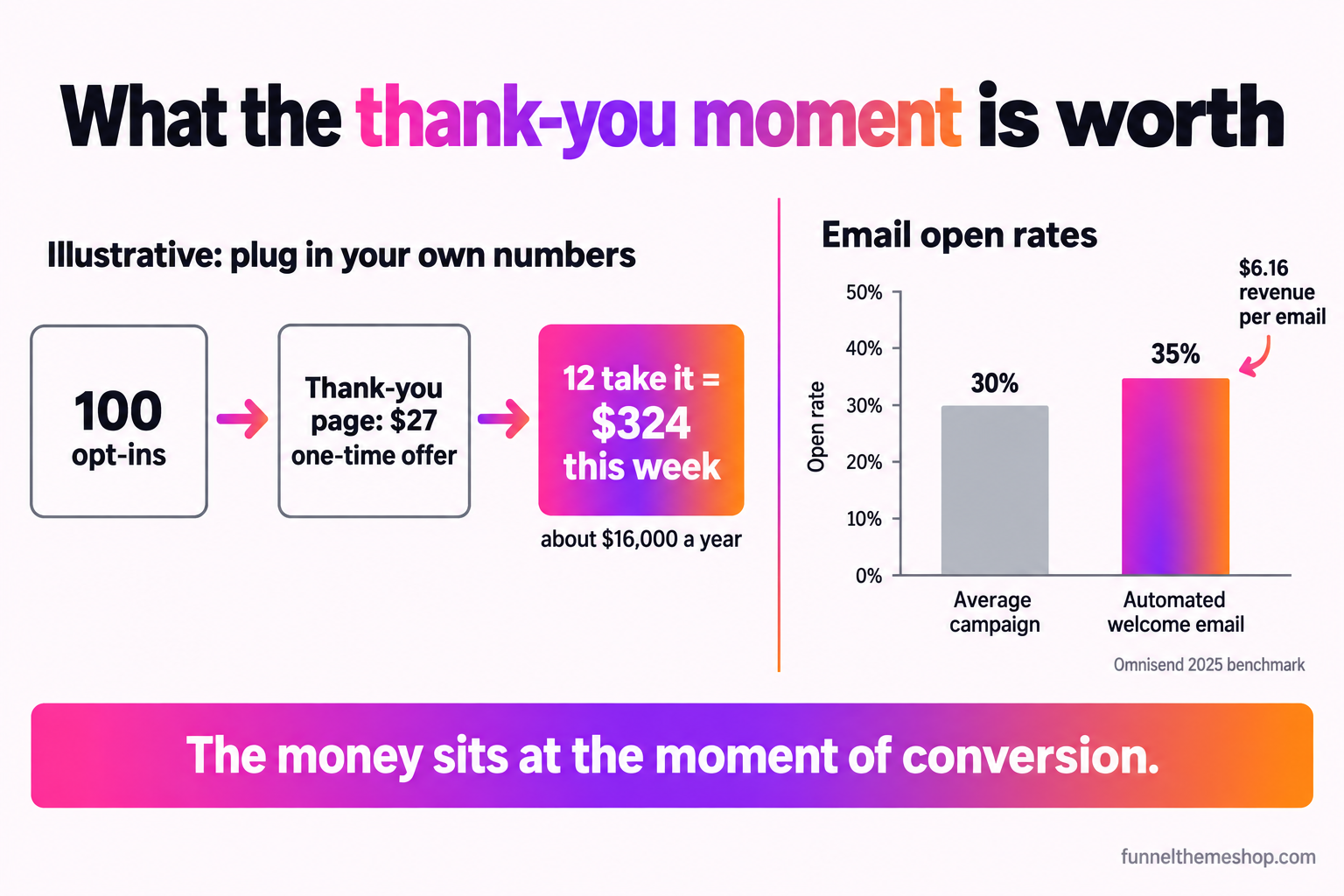
The same pattern shows up in your email, which matters because the thank-you page and the confirmation email are two halves of one moment. Omnisend's 2025 benchmark, drawn from more than twenty billion campaign emails across upwards of 27,000 brands, found the average broadcast campaign was opened roughly 30 percent of the time, while the automated welcome message that fires the instant someone subscribes opened closer to 35 percent and earned more revenue per email than any other type they measured, around $6.16 (omnisend.com/blog/email-marketing-benchmarks, confirmed via search snippet this run, not independently fetched). The message attached to the moment of conversion beats everything you will ever broadcast to the same list. Your thank-you page is the on-site twin of that message, and it deserves the same respect: your clearest next step and your best-fitting offer, not a sentence and a dead end.
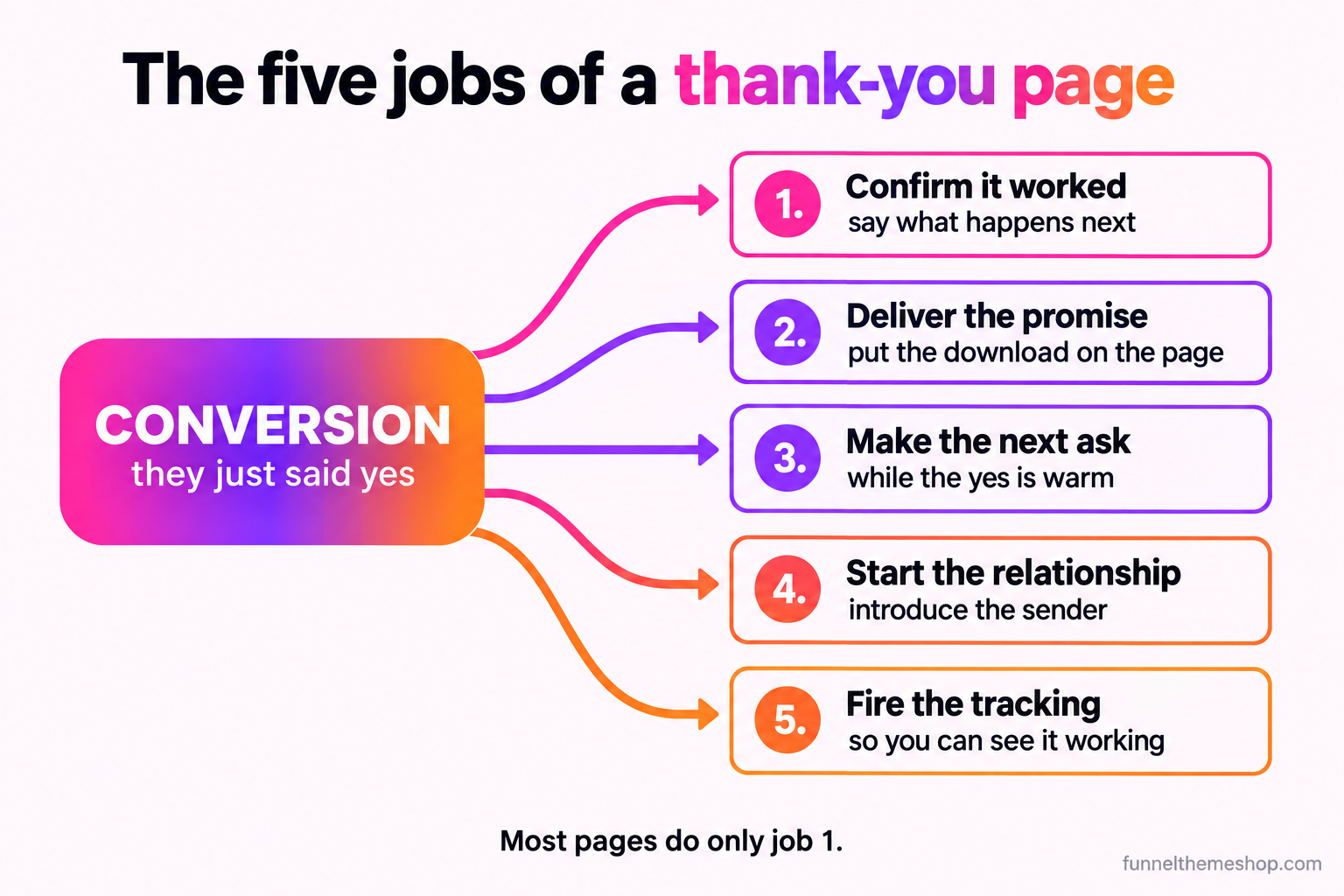
The five jobs a thank-you page can do
A thank-you page can do up to five distinct jobs, and most do only the first. Loading all five onto every page is its own mistake, so the craft is in choosing which of the other four fit this funnel. Build them in the order below, and add a job only once the one before it is solid, because each assumes the previous one is handled.
Job 1: confirm it worked, and say what happens next
The baseline job, and the one every page already attempts, is confirmation. But most pages stop at "thanks" when the useful version is "here is exactly what just happened and what you should do in the next five minutes." Name the thing they signed up for, tell them where it is going (check the inbox, add this to the calendar, watch for a text), and give a timeframe so they are not left wondering whether the form worked. A confused visitor refreshes the page or emails you to ask if it went through, and both are friction you created by being vague. Confirmation done well is not filler. It is the trust that lets you ask for the next thing on the same page without feeling pushy.
Job 2: deliver what was promised, on the page itself
If you promised a resource, put it on the thank-you page as well as in the email, not only in the email. Email delivery is never certain, and burying the download behind an inbox check adds a step where you can afford none. A visible button to the guide, the checklist or the replay, right there on the page, means the person gets what they came for without leaving the funnel, and it keeps them on a page you control for a few seconds longer. Those seconds are where Job 3 lives. This is the natural home of the lead magnet funnel: the magnet is the promise, the thank-you page is where you keep it instantly instead of making the prospect hunt for it.
Job 3: make the next ask while the yes is still warm
This is the job that turns a cost centre into a profit centre, and it is the one almost everyone skips. The person just converted, which means they are the most qualified lead you have all week, and they are standing on a page with nothing to do next. Give them something. For a free opt-in, the next ask is usually a low-ticket tripwire or a book-a-call invitation. For a purchase, it is a one-time offer that complements what they just bought. The rule is that the ask has to fit the moment: it should feel like the obvious next step, not a swerve into an unrelated pitch. The mechanics of which ask to use, and the difference between a true one-time upsell and an order bump that belongs back on the checkout, are worth getting right, and order bump vs upsell walks that decision in full.
Job 4: start the relationship, not just the transaction
Even when there is nothing to sell on the page, there is a relationship to begin. A good thank-you page tells the new lead who you are, what the next few emails will bring, and how to get a faster answer if they need one. A short line and a face does more than it looks like it does: it converts an anonymous form-fill into a person who now expects to hear from a named human rather than a faceless brand. This is also where you set the frequency promise, so your first broadcast is not a surprise that earns an unsubscribe. The relationship you start on the thank-you page is the one your nurture sequence spends the next two weeks building on.
Job 5: fire the tracking, so you can see any of this working
The thank-you page is the natural place to fire a conversion event, because reaching it is proof the action completed. A pixel or conversion tag here tells your ad platform which clicks turned into leads, which is the signal the platform needs to find you more of the same people. Skip it and you are optimising blind, paying for clicks with no idea which ones became customers. Set it up once on the page every converter lands on and every funnel you own inherits the measurement. The full method, including how to keep the browser number and the CRM number from disagreeing, is in GoHighLevel conversion tracking, and it is the quiet job that makes the other four measurable.
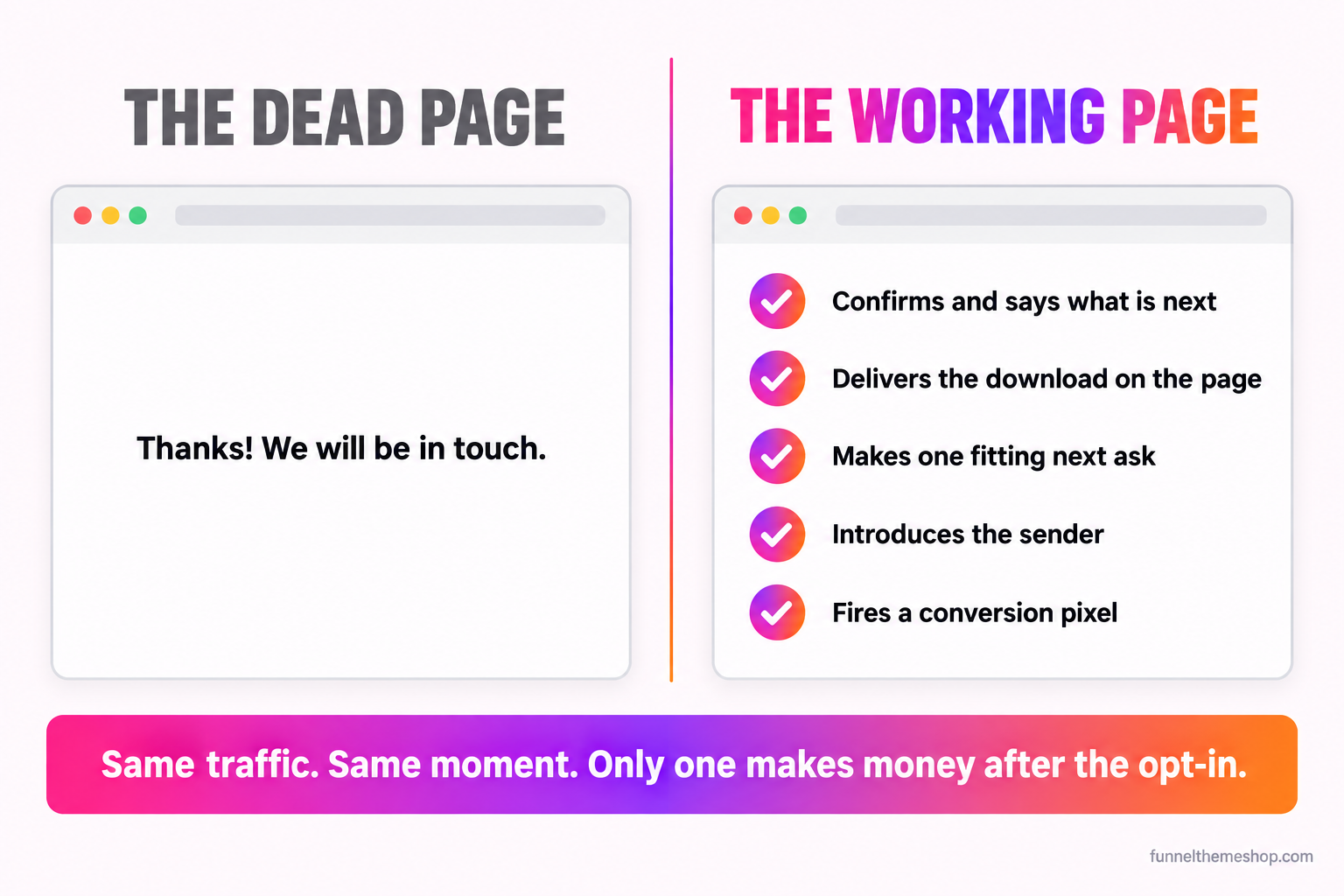
Match the page to the funnel: a decision table
There is no single correct thank-you page, because the right primary job changes with the funnel in front of it. A booking funnel and a lead-magnet funnel want very different things from the same slot. Here is how the main job and the single best next ask shift by funnel type, so you can pick the two or three jobs that fit yours rather than defaulting to all five or to none.
| Funnel type | The page's main job | The one next ask | What to avoid |
|---|---|---|---|
| Lead magnet opt-in | Deliver the magnet on-page and confirm the email | A low-ticket tripwire or a book-a-call | Hiding the download behind an inbox check only |
| Booking or appointment | Confirm the slot, add it to the calendar, set reminders | A short prep step or intake question | A "we will be in touch" with no instant booking |
| Low-ticket purchase | Confirm the order and set the delivery expectation | A one-time offer that complements the buy | An unrelated hard pitch that breaks trust |
| Webinar or VSL registration | Confirm registration and add it to the calendar | Watch now if evergreen, or a pre-event resource | A long silent gap with no engagement before the event |
| Application or high-ticket | Route a qualified applicant to an instant calendar | Book the call in the next two days | A manual-review dead end that cools a hot lead |
The bottom row is worth a note, because it is where the stakes are highest. An application funnel that drops a qualified person onto a "we will review and get back to you" page is burning the most expensive lead it has, and the fix is to route by score straight to a live calendar. That full pattern is covered in the high-ticket application funnel, and the same instant-booking logic behind it is exactly what a booking-heavy trade needs from its confirmation page. If your funnel sits in the appointment world, the booking-funnels category collects the snapshots tuned for it.
The numbers: what the thank-you moment is actually worth
This stops being a philosophy the moment you put figures to it, so here is the shape with the assumptions on the table for you to swap out. Say 100 people opt in to your lead magnet this week, which is a quiet week for plenty of funnels. On the dead version of the page they download the guide and leave, and the page earns nothing. Now add Job 3: a single one-time offer on the thank-you page, a small complementary product at, say, $27. If even 12 of those 100 take it, which is a conservative rate for an offer shown at the highest-intent moment in the funnel, that page just made $324 this week off traffic you had already paid for. Over a year that is a little over $16,000 from a page that used to say "thanks" and stop. The take rate is illustrative and yours will differ, but the mechanism does not: the offer is shown to people who just raised their hand, which is why it converts far above a cold ad.
The email half compounds it. Because the confirmation message is the automated one tied to the moment of conversion, it is opened at a rate your weekly broadcast cannot touch, as the Omnisend figure above shows. That means a link inside it, back to the same offer or to a book-a-call, is seen by a far larger share of the list than any campaign you send later. The page and the email reinforce each other: the page makes the ask while the person is on it, and the email makes the same ask again to the large fraction who open it minutes later. Two shots at the warmest moment you will get, both automated once and then running on every opt-in without you touching them.
The part people overestimate is the platform cost. You do not need a separate page builder, a separate upsell app, a separate scheduler and a separate SMS tool to run any of this. The thank-you page, the one-time offer, the booking calendar, the confirmation email and the reminder texts all live inside one GoHighLevel account. HighLevel's own plans run from $97 a month on Starter to $297 on Unlimited and $497 on Agency Pro, each with a 14-day trial (gohighlevel.com/pricing, confirmed via search snippet this run on 2026-10-12, not independently fetched). One account runs this funnel and every other funnel you own, so the marginal cost of upgrading a dead thank-you page to a working one is close to zero. If you are still weighing the platform itself against a stack of single-purpose tools, GoHighLevel vs ClickFunnels does that comparison.
Where thank-you pages break
Four failure modes account for almost every thank-you page that gets built and then earns nothing. Each has a symptom you can see, a cause underneath it and a fix you can ship this afternoon.
Break 1: the "thanks, we will be in touch" dead end
Symptom: your opt-in rate is healthy, your revenue per lead is flat, and the thank-you page has nothing on it but a sentence. Cause: the page was built as an afterthought, a required destination for the form rather than a stage in the funnel. Fix: add Job 1 done properly and at least one of Jobs 3 or 4. Even the smallest working version, a clear confirmation plus a single book-a-call button, beats a bare "thanks" by a wide margin, and it takes ten minutes. The dead page is the most common break and the cheapest to fix, which is a frustrating combination once you notice how much it has been costing.
Break 2: the page that asks for too much, too soon
Symptom: you added an offer to the thank-you page and your opt-ins started complaining, or the offer converts at near zero and seems to sour the relationship. Cause: the ask does not fit the moment. Someone who just grabbed a free checklist is not ready for a $2,000 pitch three seconds later, and a mismatched ask reads as a bait and switch. Fix: step the ask down to fit the temperature. After a free opt-in, the right next ask is small: a low-cost tripwire or a no-pressure call, not your flagship offer. Save the big ask for later in the sequence, once the relationship from Job 4 has done some work. One fitting ask beats one aggressive one every time.
Break 3: the confirmation that never actually arrives
Symptom: people reach the thank-you page but swear they never got the email or the text, and your delivery promise quietly breaks on the first interaction. Cause: the page is live but the workflow behind it was never connected, or its trigger is filtering the submission out, so the page shows but the automation never fires. This is common enough on GoHighLevel that it has its own diagnosis: the form submits but the workflow never fires walks the exact checks, from trigger filters to published-versus-draft state. Fix: test the whole path with a real submission before you send a dollar of traffic, and watch the contact appear with the download or the calendar invite actually landing. A thank-you page that confirms a thing that never happened is worse than no page.
Break 4: the page you cannot see
Symptom: you are running ads to the funnel, leads are coming in, and you have no idea which campaigns produced them because nothing is tracked at the finish. Cause: no conversion event on the thank-you page, so the ad platform is guessing and your reporting is a shrug. Fix: fire the pixel or conversion tag on the page, as Job 5 describes, and confirm it registers in both the ad platform and the CRM. Until the thank-you page reports a conversion, every optimisation decision upstream is a guess, and the platform cannot find more of your best buyers because you never told it who they were.
Three objections worth answering honestly
If you are about to rebuild a thank-you page you have ignored for a year, three arguments usually surface. They deserve straight answers, including the one where leaving the page simple is the right call.
"An offer on the thank-you page feels greedy"
It feels greedy only when the offer does not fit the moment, which is Break 2, not an argument against the whole idea. A relevant next step offered to someone who just said yes is a service, not a shakedown: it answers the "what now?" the visitor is already feeling. The test is whether the ask would make sense if a helpful human said it out loud. "You grabbed the pricing checklist, want me to walk you through your numbers on a quick call?" is generous. "Buy my $2,000 programme" to the same person is not. Fit the ask to the moment and the greed objection dissolves, because the page is now doing the visitor a favour rather than ambushing them.
"My thank-you page already works, it delivers the download"
Delivering the download is Job 2, and doing it on-page instead of only by email is genuinely good. But delivery is table stakes, not the finish. The question is what the page does in the seconds after the download button, while the person is still there and still warm. If the answer is nothing, the page is working the way a shop works when it hands you your item and then locks the door behind you before you can browse. Keep the delivery, and add one next ask and one conversion event. You are not fixing something broken, you are collecting on intent you already earned and currently throw away.
"This is a lot of engineering for one page"
Sometimes it is, and sometimes a plain confirmation is exactly right. If your funnel is a pure booking flow where the only sane next step is the call you already booked, then Jobs 1 and 5 are the whole job and adding a tripwire would just be noise. Match the effort to the funnel: a lead-magnet page that feeds a nurture sequence earns every one of the five jobs, while a simple appointment confirmation earns two. The point is not to maximise the page, it is to stop under-building it by default. Decide which jobs belong, build those well, and leave the rest off on purpose rather than by neglect.
Build it, or start from a snapshot that already has it
You can build every piece of this by hand in GoHighLevel, and the five jobs above are the blueprint. The page, the one-time offer, the booking calendar, the confirmation email and the SMS reminders are all native to the platform, so give yourself an afternoon to wire the page and the automation and a second pass to test the whole path end to end. Do not send traffic until a real submission lands with the download served, the email delivered, the calendar invite created and the conversion event fired. A thank-you page is the last place you want a silent failure, because it is the first impression after someone trusted you with their details.
The alternative is to start from a snapshot where the post-conversion moment is already wired and spend your time on the part only you can do, which is the offer and the words. A snapshot built for a booking-heavy trade imports with the confirmation page, the calendar and the reminder-and-recovery sequence already connected, and that same sequence is what lets it target recovering as much as 70 percent of no-shows and a steady cadence of five to ten reviews a month, both as the system's aim rather than a promised result. The dental funnel snapshot is built around exactly this confirm-and-remind motion for appointment-led practices. What arrives is a snapshot share link and a PDF with the full installation instructions, delivered within 24 business hours, and importing it for you is an optional $175 add-on if you would rather not spend the afternoon. All sales are final, so ask whatever you need before you buy.
Whichever way you build it, the principle holds. The page after conversion is the warmest moment your funnel will ever create, and treating it as a receipt instead of an opportunity is the quiet, expensive habit of most GoHighLevel accounts. Decide what the page is for, give the visitor a reason to keep going, and the thirty seconds you were throwing away becomes the most productive part of the funnel. That is the entire job, and it is worth more than its effort by a wide margin.
Frequently asked
What should a GoHighLevel thank-you page include?
At minimum, a clear confirmation of what just happened and what to do next, plus a conversion event so you can track the opt-in. Beyond that, deliver the promised resource on the page, make one next ask that fits the moment (a tripwire, a call or a complementary offer), and introduce the sender to start the relationship. Pick the jobs that fit your funnel rather than cramming all five onto every page.
Should I put an upsell on my thank-you page?
Usually yes, as long as the offer fits the moment. The visitor just converted, which makes them the most qualified lead you have, so a relevant next step converts far above a cold ad. The mistake is asking for too much too soon: after a free opt-in, offer a small tripwire or a call, not your flagship product. An offer that fits reads as helpful, not greedy.
Why is the thank-you page important for ad tracking?
Reaching the thank-you page is proof the action completed, which makes it the natural place to fire a conversion pixel or tag. That event tells your ad platform which clicks became leads, so it can find more people like them. Without it you are optimising blind and paying for clicks with no idea which ones converted.
People reach my thank-you page but never get the email. What is wrong?
The page is live but the workflow behind the form was most likely never connected, or its trigger is filtering the submission out, so the page shows while the automation never fires. Test the whole path with a real submission and watch the contact appear with the email and any calendar invite actually landing before you send traffic to it.
Does every funnel need a complex thank-you page?
No. Match the effort to the funnel. A lead-magnet page feeding a nurture sequence earns all five jobs, while a simple appointment confirmation earns two: confirm the booking and fire the tracking. The goal is to stop under-building the page by default, then deliberately leave off the jobs that do not fit rather than skipping them by neglect.
Related guides
More funnel guides
The Lead Magnet Funnel: What to Offer, and What Happens Next
The download is the smallest part of a lead magnet funnel. What decides whether it works is what the offer promises and what happens in the ninety seconds after somebody claims it.
10 min readStrategyOrder Bump vs Upsell: What Goes Where, and Why It Matters
They look like the same idea in two places. They are not. One removes a decision, the other asks for a bigger one, and putting the wrong offer in the wrong slot costs you both.
10 min readStrategyHigh-Converting Landing Page Anatomy: Every Block, Top to Bottom
A landing page is nine blocks doing nine jobs. Get the order right and the copy has somewhere to live. Get it wrong and you are decorating a page that argues with itself.
12 min readFunnel snapshots · done-for-you builds
Pick a funnel, or hand us the offer
Buy the snapshot and it lands within 24 business hours as a share link and an installation PDF, add the $175 install if you would rather not do it yourself, or hand us the offer and we build the whole thing.
All sales final once the snapshot link is sent · free updates for life · one licence covers every sub-account you own