Guides
The GoHighLevel webinar funnel: from registration to the buy button
A webinar is one hour. The funnel around it is six pages and three sequences, and it is the part that decides whether anyone shows up, stays to the offer, or ever buys.
It is Wednesday night and a coach is standing in front of her ring light with a sixty-slide deck, delivering the best training of her life to forty-one people. Two hundred and twenty registered. One hundred and seventy-nine are somewhere else. When she reaches the offer at minute fifty-two, the live count has drifted to twenty-six, and by the time she posts the checkout link in the chat, nine of those have left to put a child to bed. She closes two sales. The training was excellent. The webinar was not the problem. The funnel around it was never built, so the webinar was carrying weight it was never designed to hold.
This is the quiet truth about selling with a webinar. The hour on camera is maybe a fifth of the machine. The other four fifths is a registration page that earns the sign-up, a reminder sequence that turns a sign-up into a seat, an offer that is built into the presentation rather than bolted on at the end, and a replay-and-follow-up sequence that catches the people who were always going to buy on the second viewing. Get those right and a mediocre webinar outsells a brilliant one with no funnel behind it. This guide builds the whole thing in GoHighLevel, page by page and sequence by sequence, in the order you should actually build it.
What a webinar funnel actually is
A webinar funnel is the set of pages and automations that get a stranger to register, remind them until they show, teach them something real, make them an offer with a reason to act now, and then chase the ones who did not buy with a replay and a closing window. The webinar is the event in the middle. The funnel is everything that feeds it and everything that catches what falls out of it. People conflate the two, build the webinar, and wonder why registrations stall at a trickle and the few who sign up never turn up. They built the event and skipped the machine.
The mechanics are not exotic and you do not need a separate webinar platform, a separate email tool and a separate page builder stitched together with duct tape. The registration page, the confirmation page, the reminder emails and texts, the replay page and the follow-up sequence all live in one GoHighLevel account, triggered off a single form submission. If you want the wider map of where a webinar funnel sits among the other funnel types before you commit to building one, the GoHighLevel funnel builder guide lays out the full set and the job each one is for. A webinar funnel is the tool when your offer needs teaching before it can be sold, which is most offers above a few hundred dollars that depend on the buyer understanding something they do not understand yet.
Live or evergreen: decide this before you build a single page
This is the first fork and it changes what you build, so take it before you open the funnel builder. A live webinar is you, on camera, at a set time, once. It carries real urgency because the event is genuinely happening and genuinely ending, and that urgency is the single biggest lever on both registration and attendance. The cost is that you have to show up and run it, and you are limited to the people who can make that one slot. An evergreen webinar is a recording presented as if it were scheduled, running on a loop so a registrant can watch within minutes of signing up. It scales without you and it catches intent while it is hot, but you have to manufacture the urgency the live event had for free, and if you fake it clumsily, people notice and the trust you need to sell evaporates.
There is a third option that most mature webinar funnels end up at: run it live a few times until the presentation and the offer are proven, record the best run, then put that recording on evergreen and keep the live version for launches. You get the honesty of a real event while you are learning what converts, and the scale of a recording once you know. Whichever you pick, the page structure below is almost identical. The differences are in the reminder timing and in how you handle the replay window, and both are called out where they matter.
The six pages, built in order
A webinar funnel is six pages doing six distinct jobs, plus the email and SMS sequences that connect them. Build the pages in this order, because each assumes the one before it did its work. The most common way this goes wrong is building the webinar room first, falling in love with the presentation, and treating the registration and follow-up as afterthoughts. The pages that bracket the webinar are where the money is won or lost.
1. The registration page: sell the outcome, not the webinar
The registration page has one job: convince a stranger that one specific hour of their life is worth trading an email for. The mistake that kills most registration pages is selling the webinar instead of the outcome. Nobody wants to attend a webinar. They want the thing the webinar promises to give them. So the headline names a specific result and a timeframe, not a topic. "How to fill a yoga studio to 80 percent capacity without discounting" beats "A Webinar About Marketing Your Studio" every time, because one is an outcome and the other is a chore. Underneath, three or four bullet points that each promise a concrete takeaway, a line about who it is for and who it is not, and a single registration form asking for as little as you can get away with.
Keep the form short here, which is the opposite of the advice for an application funnel where friction is the whole point. At the registration stage you are buying volume, because every registrant is a chance to show up, and you qualify later with the content itself. Name and email is usually enough. Add a phone field only if you intend to send SMS reminders, and if you do, say so plainly next to the field, because a reminder text is worth far more than it costs you in form abandonment. The deeper anatomy of a page that converts cold traffic, block by block, is in high-converting landing page anatomy, and a registration page is just that page tuned for one specific ask.
2. The confirmation page: the most wasted page in the funnel
The page a registrant sees the instant they sign up is almost always a dead "thanks, check your email," and that is a waste of your hottest moment. The confirmation page should do three things. It should confirm the date and time in the registrant's own words and offer a one-tap add-to-calendar link, because a webinar that lives in someone's calendar is one they plan around. It should tell them exactly what to do next and set an expectation for the reminders so they watch for them. And if you have a low-commitment next step, a short pre-webinar video or a worksheet to bring, this is where it goes, because a registrant who does a little homework before the event shows up more committed than one who forgot they signed up. The broader argument for treating this page as a worker rather than a receipt is in what your thank-you page is actually for, and it applies here with interest.
3. The reminder sequence: this is where attendance is won
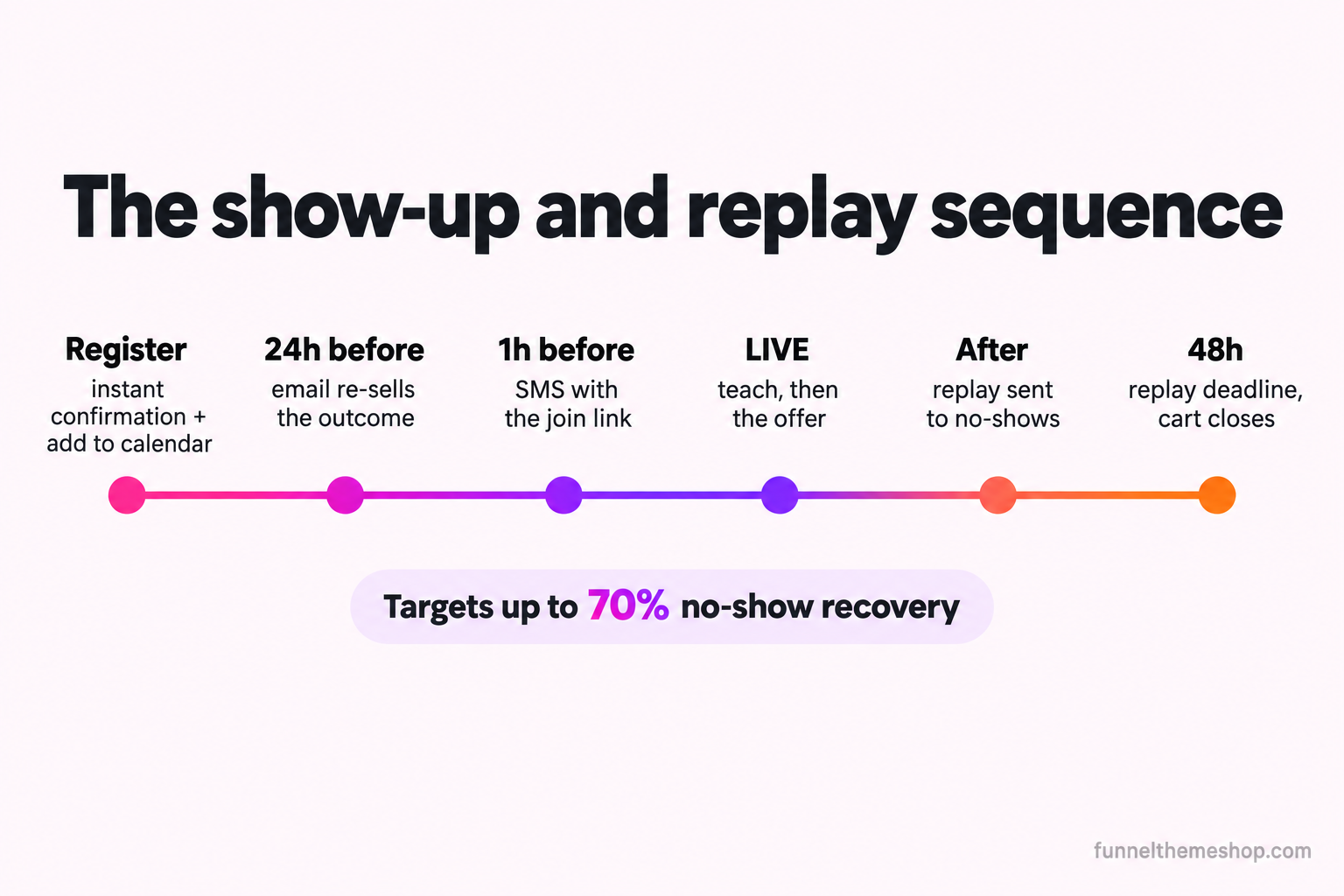
Attendance is not luck and it is not a reflection of how good your topic is. It is engineered by a reminder sequence, and the gap between a funnel with one and a funnel without one is the difference between a full room and an empty one. The sequence is a mix of email and SMS, and the timing is the mechanism. At registration, an instant confirmation email with the calendar invite. The day before, an email that re-sells the one outcome they registered for, not a dry "see you tomorrow," because by now they have half forgotten why they signed up. One hour before, an SMS with the join link, because at that range email is losing the battle for attention and the phone is winning it. And a "we are live now" message at the start, with the link again, for the people who meant to join and got pulled away.
For an evergreen funnel the same sequence compresses. If the registrant can watch within fifteen minutes, your reminder is a single immediate email and a text with the link, and the "day before" email does not exist because there is no day before. The art of evergreen is making the near-instant access feel like an event rather than a file download, which you do with a countdown to the session start and a session that genuinely begins at a set time rather than scrubbing to wherever they land. The one rule that holds for both: if the reminder workflow is not firing, none of this happens, and a registration page with a broken workflow behind it is just a list of people who will never hear from you. When reminders silently stop, the cause is almost always the workflow trigger, and the exact checks are in the form submits but the workflow will not fire.
4. The webinar room: teach first, pitch built in
The room is where the teaching happens, and the structure of the hour is a sales decision, not a presentation-skills one. The shape that works is simple: open with the promise and a reason to stay to the end, teach three things that are genuinely useful on their own, then transition to the offer as the natural next step for someone who wants the full result rather than the three pieces of it. The transition is the hinge. A webinar that teaches for fifty-five minutes and then lurches into a hard pitch for five feels like a bait and switch, and the live count falls off a cliff the moment people smell it. A webinar that has been quietly pointing at the offer the whole way through, by naming the gap between what you just taught and the complete system, earns the pitch and keeps the room.
Put a reason to stay near the start, because the single biggest predictor of whether someone sees your offer is whether they are still there when you make it. A worksheet delivered at the end, a tool you only share with people who stay, a live question-and-answer, anything that makes leaving early cost something. The offer itself, when you reach it, should be the top of a coherent ladder rather than a random product, which is the whole argument of the offer stack: what you sell at the end of a webinar converts far better when it is the obvious next rung from what you just taught.
5. The offer and checkout page: live link, real deadline
During the live webinar the offer lives on a dedicated page you drop into the chat, not a vague "email me." It carries the offer, the price, the stack of what is included, the answers to the two or three objections you know are coming, and a checkout that works on a phone, because a meaningful share of your room is watching on one. The page should be the same page whether someone buys live, buys from the replay, or buys from the follow-up email, so there is one source of truth for the offer and one deadline governing all of it.
That deadline is the engine of a webinar offer, and it has to be real. The reason a webinar converts better than a plain sales page is urgency: the event happened, the offer was made in it, and the offer closes. If the offer never closes, you have taught a free class and handed out a coupon with no expiry, and the people who were going to buy on urgency now buy on nothing, which means later, which means never. Set a genuine window, usually somewhere between the end of the webinar and a few days after, enforce it with a countdown on the page and a cart-close automation that actually disables the checkout, and never quietly reopen it, because the first time your audience learns your deadlines are fake, every future deadline stops working.
6. The replay page: where half your sales actually happen
Most of the people who register will not attend live. That is not a failure, it is arithmetic, and the replay page is how you sell to them anyway. The moment the live session ends, the no-shows and the early-leavers get a replay link, and the replay is not available forever. It is available until the same cart-close deadline as the live offer, which keeps the urgency intact for the people who are watching a day late. The replay page carries the recording, the same offer page link, and a visible countdown to the close. For an evergreen funnel the replay logic is the same loop running continuously, each registrant on their own clock from the moment they signed up.
The reason this page matters so much is that a large share of webinar buyers are replay buyers. They could not make the live slot, they watched on their own time, and they bought because the offer was still open when they got there. A funnel that sends no replay, or sends one with no deadline, is leaving those sales on the floor. This is the same recovery logic that a snapshot built for a booking-heavy trade applies to missed calls, where the system targets recovering up to 70 percent of no-shows through automated reminders and a second chance to act. A webinar no-show and a missed sales call are the same leak with different labels, and both are the most recoverable revenue in the whole funnel.
The numbers: how many registrants actually show, and what that costs
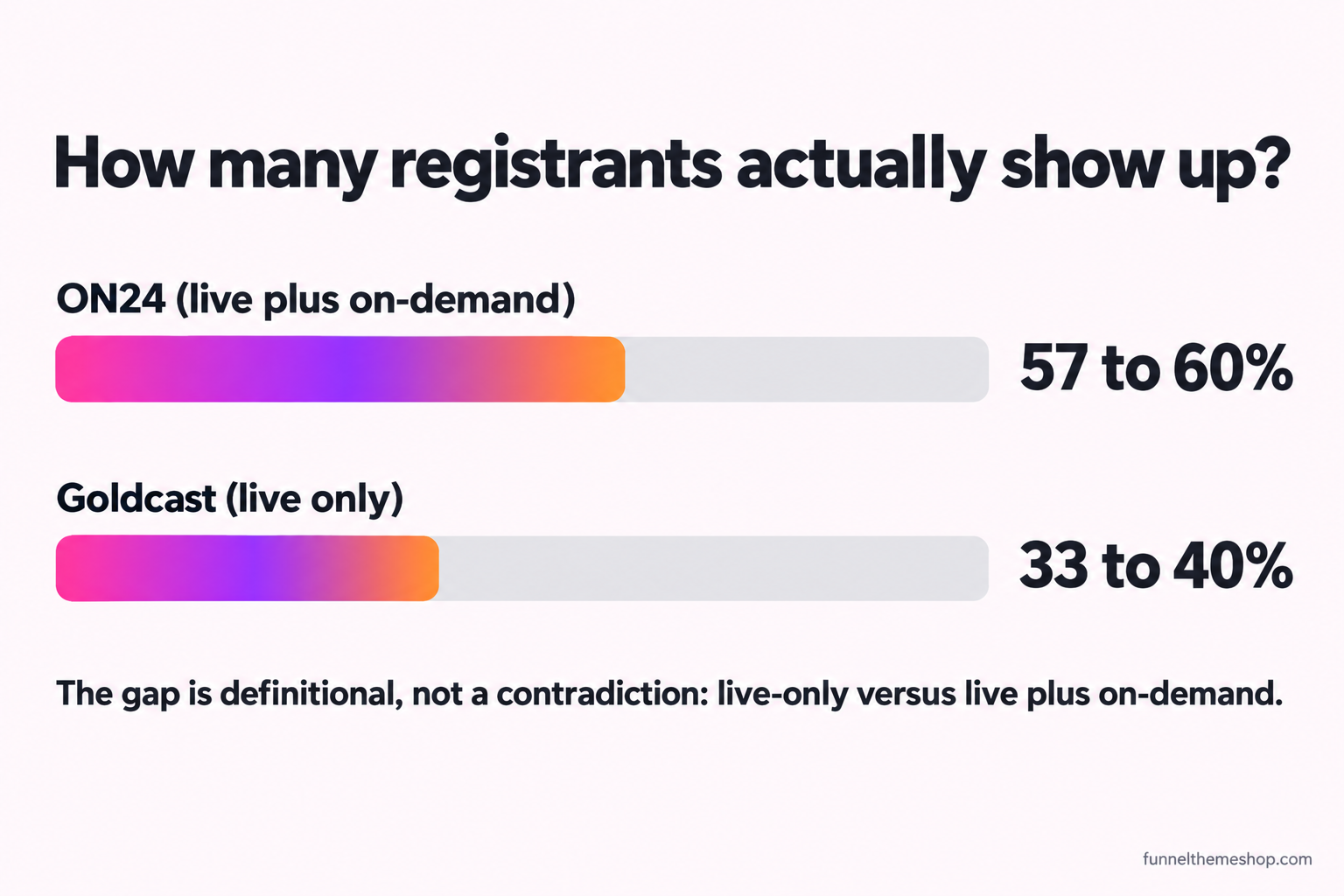
Here is where a webinar funnel stops being a diagram and becomes arithmetic. The number that governs everything downstream is the attendance rate, the share of registrants who actually turn up, and it is also the number people are most wrong about. Industry benchmarks vary widely, mostly because vendors define attendance differently. ON24's benchmarks report put the average registration-to-attendance rate at 57 percent for 2024 webinars, rising to 60 percent in its following report for 2025 (on24.com/blog), a figure that appears to count live plus on-demand viewing. Goldcast's 2025 webinar statistics, using a stricter live-only measure, reported an average closer to 33 percent, with a later analysis of its own dataset landing around 40 percent (goldcast.io). Both of those are confirmed via search snippet this run on 2026-10-15, not independently fetched from the source reports.
The honest takeaway is not a single magic percentage, it is this: somewhere between a third and two thirds of your registrants will watch, the live-only number sits lower than the headline figures vendors like to quote, and the reminder sequence above is the main thing you control that moves it. Plan your funnel on the lower end, around a third showing up live, and treat the replay as the mechanism that turns the other two thirds from a loss into a second audience. A funnel built on the assumption that 60 percent will show up live is a funnel that will disappoint you; one built on 35 percent live and a hard-working replay is one that will surprise you.
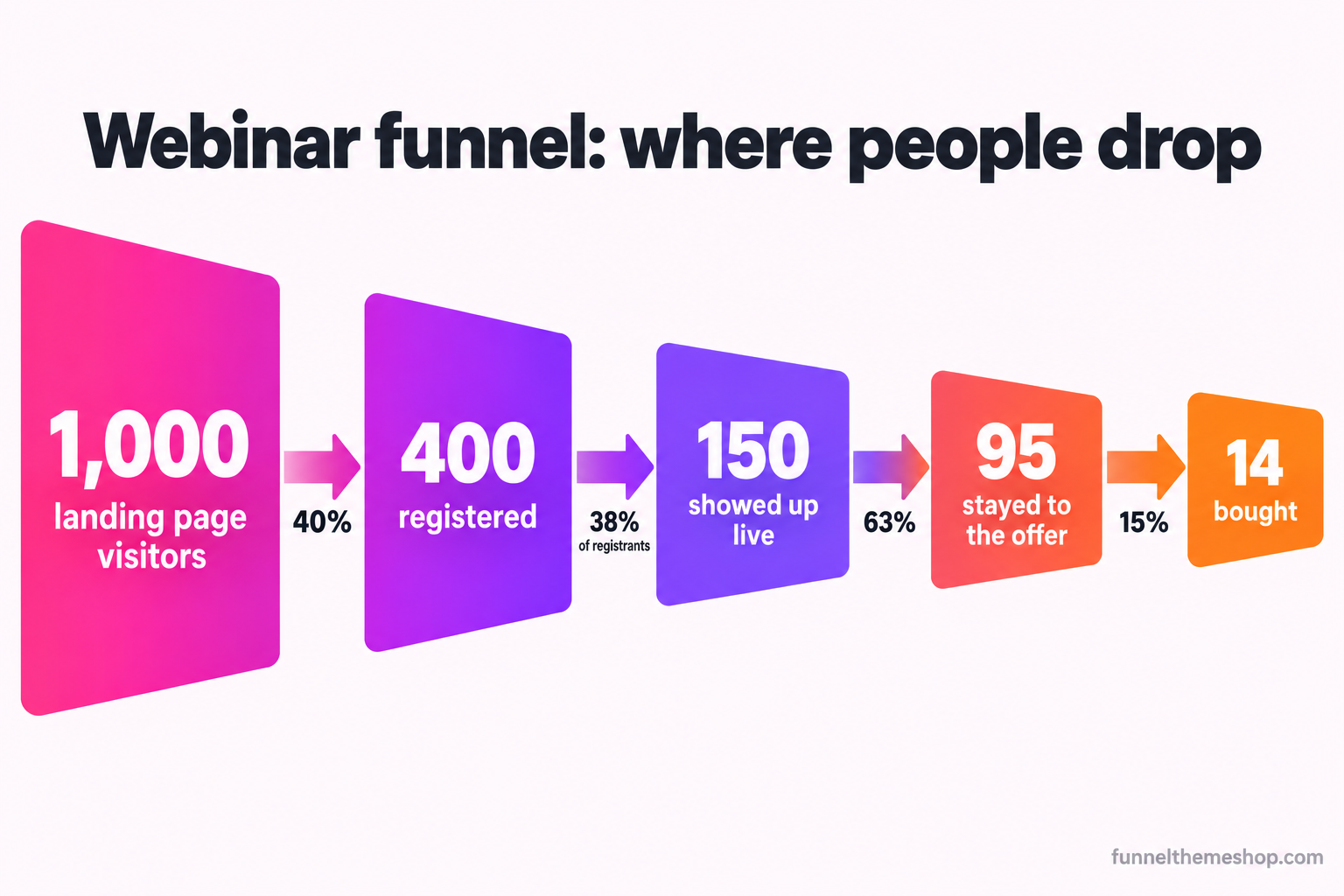
Now put real money through it, with assumptions you can swap for your own. Say a click to your registration page costs $4 and you buy 1,000 of them, so $4,000 of traffic. At a 40 percent registration rate, 400 people sign up. At a 38 percent live show rate, around 150 attend live, and say 95 of them stay to the offer. The replay then does its work and brings a chunk of the 250 no-shows back over the cart window. If the live and replay together convert 3.5 percent of your 400 registrants on a $500 offer, that is 14 sales and $7,000, against $4,000 in traffic plus the webinar's build cost. The numbers are illustrative and your real figures will differ on every line, but the mechanism is fixed: the registration rate and the show rate are set by the pages and the reminders, and the replay is what rescues the majority who never attend live.
The platform cost is the part people overestimate badly. You do not need a dedicated webinar subscription on top of your funnel tools. HighLevel's own plans run from $97 a month on Starter to $297 on Unlimited and $497 on the top Agency tier, each with a 14-day trial (gohighlevel.com/pricing, confirmed via search snippet on 2026-10-15). One account hosts the registration page, the reminder automations, the offer page, the checkout, the replay logic and the follow-up, and it runs every other funnel you own at the same time, so the marginal cost of adding a webinar funnel to an account you already pay for is close to nothing. If you are still weighing the platform itself against a stack of single-purpose tools, GoHighLevel vs ClickFunnels works through that comparison in full.
Which funnel shape your webinar should feed
A webinar does not sell in a vacuum. It feeds something, and what it feeds changes how you build the end of it. The deciding factor is your price and whether a human call is part of the sale. Here is the decision laid out.
| Offer at the end | What the webinar should drive to | The deadline | Watch out for |
|---|---|---|---|
| Under $500, self-serve | A checkout page, buy direct from the replay | Cart closes a few days after | Making the pitch so soft nobody acts |
| $500 to $2,000 | A checkout, or a short booking for the bigger tier | Cart close plus a bonus deadline | Two deadlines that confuse the one urgency |
| $2,000 and up | An application, then a booked call | The application closes, not the cart | Selling the full price on the webinar instead of the call |
| Recurring or retainer | A trial or a booked onboarding call | A start-date urgency, not a price one | Urgency that feels fake for a subscription |
Notice that as the price climbs, the webinar stops being the close and becomes the warm-up for a call. Above a couple of thousand dollars, the smart move is to use the hour to teach and raise intent, then send qualified viewers into an application funnel rather than trying to collect two thousand dollars on a checkout at minute fifty-eight. The webinar's job there is to make the application feel like the obvious next step, which it does by showing people the size of the gap between what they can do alone and what the full system delivers. For a clean overview of which funnel shape belongs to which situation, the high-converting funnel structure guide maps the four that cover almost everything.
Where webinar funnels break
Four failure modes account for nearly every webinar funnel that gets built and then quietly underperforms. Each has a symptom, a cause and a fix, and none of them is "make a better webinar."
Break 1: the registration page that sells the webinar
Symptom: traffic arrives, almost nobody registers, and the page feels like it should be working. Cause: the headline promises a webinar rather than an outcome, so there is nothing to want. "Join our free training on funnels" asks for an email in exchange for the privilege of being marketed to. Fix: rewrite the headline as a specific result with a timeframe, replace the topic bullets with concrete takeaways, and name who it is for. A registrant should be able to say in one sentence what they will be able to do after the hour that they cannot do now. If they cannot, the page has not earned the sign-up.
Break 2: the empty room
Symptom: healthy registration numbers, a painfully small live audience. Cause: no reminder sequence, or a weak one that says "see you tomorrow" without re-selling the reason to attend. People registered days ago on a whim and have forgotten why. Fix: the full sequence above, with the day-before email re-selling the outcome and the one-hour SMS carrying the join link. If you are only going to add one thing, add the SMS at one hour out, because it is the single most valuable message in the whole funnel and the one most funnels skip.
Break 3: the offer with no deadline
Symptom: people watch, people say they loved it, almost nobody buys, and the ones who do buy trickle in slowly and then stop. Cause: the offer never closes, so there is no reason to act today rather than someday, and someday does not come. Fix: set a genuine cart-close window, put a live countdown on the offer page, and enforce it with an automation that disables the checkout when the clock hits zero. The replay stays available only until that same deadline. The urgency has to be real, because a fake deadline works exactly once and then poisons every deadline you set afterward.
Break 4: the registration that reaches nobody
Symptom: someone swears they registered, and they never got a confirmation, a reminder or a replay. Cause: the registration form is live but the workflow behind it was never connected, or its trigger is filtering the submission out, so the whole reminder sequence silently never runs. This is common enough on the platform to have its own diagnosis, and the checks are in the form submits but the workflow will not fire. Fix: test the entire path end to end with a real registration before you spend a dollar on traffic. Register as a stranger would, and confirm the confirmation email, the calendar invite, the reminders and the replay all actually arrive. A webinar funnel that drops registrants silently is worse than none, because you are paying for traffic that vanishes and you cannot see where.
Three objections worth answering honestly
If you are deciding whether a webinar funnel is worth building, three arguments usually surface. They deserve straight answers, including the one where a webinar is the wrong tool.
"Nobody sits through a sixty-minute webinar anymore"
Some of this is true and the fix is in the format, not in abandoning the model. Attention is shorter than it was, which is an argument for a tighter webinar, not for no webinar. Cut the throat-clearing, open with the promise inside the first two minutes, and earn every minute after that with something useful. A forty-minute webinar that respects the viewer's time outperforms a ninety-minute one that pads to hit a number. The model still works because the mechanism it relies on, teaching that earns the right to sell, has not changed. What has changed is how little patience people have for teaching that is really just a long advertisement, which was always a weak webinar anyway.
"I do not want to run a live webinar every week"
Then do not. This is exactly what evergreen is for. Run it live a handful of times to prove the presentation and the offer convert, record your best version, and put it on a loop so it sells while you sleep. You keep the live format for launches and for the extra urgency a genuine event brings, and you let the recording handle the steady stream of registrations in between. The one discipline evergreen demands is honesty: present it as a scheduled session, give a real session start and a real cart-close clock per registrant, and do not pretend a recording is happening live right now in a way a viewer could catch you out on. The trust you need to sell is worth more than the urgency a lie would buy.
"My offer is cheap enough to sell without all this"
Quite possibly, and this is the honest case where a webinar is the wrong move. If your offer is low-priced and self-explanatory, a webinar is a lot of machinery to sell something a good sales page could sell on its own. The webinar earns its complexity when the buyer has to understand something before they will pay, when the price is high enough that teaching changes the decision, or when the offer is new enough that it needs demonstrating. For a simple, cheap, obvious offer, build a value ladder and let a straightforward page do the selling, then introduce a webinar later if and when you add a higher tier that genuinely needs explaining. Using a webinar to sell a $27 product is effort spent in the wrong place.
Build it, or start from a snapshot that already has it wired
Every piece of this is native to GoHighLevel. The registration and confirmation pages, the reminder automations across email and SMS, the offer page with its countdown, the cart-close enforcement and the replay-and-follow-up sequence are all things you can build by hand, and the six-page order above is the blueprint to do it. Give yourself an afternoon for the pages and a second one to test the automations end to end, and do not send traffic until a real test registration has pulled every email, text, calendar invite and replay link exactly when it should.
The alternative is to start from a snapshot where the whole structure is already connected and spend your time on the part only you can do, which is the teaching and the offer. A snapshot built for this motion imports with the registration page, the reminder sequences, the offer page and the replay logic already wired together, so the technical build is finished on the day it lands. The webinar funnel snapshot is built around exactly this register-show-sell-replay flow, the business coaching funnel snapshot pairs a webinar with the application-to-call motion for higher-priced programmes, and the webinar funnels category collects the ones tuned for this shape. What arrives is a snapshot share link and a PDF with the full installation instructions, delivered within 24 business hours, and the import itself is an optional $175 add-on if you would rather we did it. All sales are final, so the pre-purchase call is the place to ask anything first, and it is free.
However you build it, the principle holds. The webinar is one hour, and the hour is not where the funnel is won. It is won on the page that earns the registration, in the sequence that fills the room, in the deadline that makes the offer real, and on the replay that sells to the majority who never showed up live. Build the machine around the hour, and a good webinar finally gets to do what it was always capable of, which is sell.
Frequently asked
What is the difference between a webinar and a webinar funnel?
The webinar is the one-hour presentation. The webinar funnel is everything around it: the registration page that earns the sign-up, the reminder sequence that gets people to show up, the offer page and checkout, and the replay sequence that sells to the majority who did not attend live. The funnel is roughly four fifths of the work and most of where sales are won or lost.
What is a realistic webinar attendance rate?
Plan on roughly a third of registrants attending live. Vendor benchmarks range widely because they define attendance differently: ON24 has reported 57 to 60 percent counting live plus on-demand, while Goldcast has reported 33 to 40 percent on a live-only measure. Build your funnel on the lower, live-only end and treat the replay as the mechanism that recovers the rest.
Should I run my webinar live or evergreen?
Run it live first to prove the presentation and the offer convert, then record your best version and put it on evergreen so it scales without you. Live carries stronger real urgency; evergreen catches intent while it is hot and runs continuously. Most mature funnels use both: evergreen for steady flow, live for launches.
Do I need a separate webinar platform on top of GoHighLevel?
No. The registration page, confirmation page, reminder emails and texts, offer page, checkout and replay logic all live inside one GoHighLevel account, triggered off a single form submission. The marginal cost of adding a webinar funnel to an account you already run is close to zero.
How long should the offer stay open after the webinar?
Set a genuine cart-close window, usually between the end of the webinar and a few days after, and keep the replay available only until that same deadline. The deadline has to be real and enforced with an automation that disables the checkout, because a fake deadline works once and then stops working for every future offer.
Related guides
More funnel guides
The High-Ticket Application Funnel: Filter Before You Book the Call
A calendar full of unqualified calls is not a win, it is a tax on your week. An application funnel puts the filter before the booking, not after it.
13 min readStrategyHigh-Converting Funnel Structure: The Four Shapes That Cover Everything
A funnel is not a set of pages. It is a sequence of state changes, and only a short handful of sequences matter for a service business. Here is how to tell which one your offer needs.
11 min readStrategyYour GoHighLevel Thank-You Page Is Doing Nothing. Here Is What It Is For.
The page after conversion is the warmest thirty seconds in your funnel, and most of them say "thanks" and stop. Here are the five jobs that page can do and how to build them in order.
13 min readFunnel snapshots · done-for-you builds
Pick a funnel, or hand us the offer
Buy the snapshot and it lands within 24 business hours as a share link and an installation PDF, add the $175 install if you would rather not do it yourself, or hand us the offer and we build the whole thing.
All sales final once the snapshot link is sent · free updates for life · one licence covers every sub-account you own