Skip to content

Appearance

Accent palette

Shop the snapshots

Shelf 08 · Contact actions bar

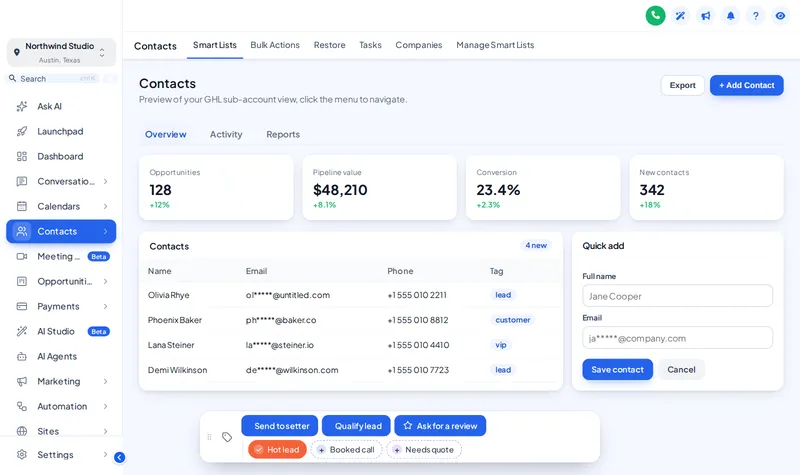
GoHighLevel contact quick actions, one tap away

Setters repeat the same three clicks on every contact: add a tag, update a field, start a follow-up. The contact actions bar puts those on one strip — quick tags, one-tap buttons and short forms — that floats on every contact record.

GoHighLevel contact record with the contact actions bar: quick tag chips and buttons along the bottom
The contact actions bar on a sample contact.

The setter’s day

Three clicks you stop repeating

  • Setters on the phone

    Mark "hot lead" or "follow up" mid-call without leaving the record.

  • Clean tagging

    Chips use the exact tag names your workflows expect, so automations trigger reliably.

  • Qualifying in seconds

    An "Update deal" form captures budget, decision date and source in one step.

Fitting room · contact actions

Tag, qualify, hand off

Tap a quick tag, press Qualify lead to open its form, drag the bar by its grip, move it to another corner. Nothing is saved in the preview.

Dressing the window…

Own colour per tag The real contact actions bar. Tap a quick tag, press Qualify lead to open its form, or drag the bar by its grip. Nothing is saved in the preview; inside GoHighLevel the contact updates at once.

Answer first

What are GoHighLevel contact quick actions?

GoHighLevel contact quick actions

GoHighLevel contact quick actions are buttons and tag chips added to the contact record by the GHL Customizer: a tap adds or removes a tag (which can start a workflow), and a button can open a short form that saves to custom fields. The bar is included from Theme Bundle.

bar positions
0
tap to tag a contact
0
included from
Theme Bundle

In the editor

Build the bar in four aisles

  1. Add your quick tags

    Name, colour and the exact tag each chip adds or removes.

  2. Add buttons

    A tag button, or a form button with the custom fields it saves.

  3. Pick a position

    6 positions; users can drag the bar by its grip.

  4. Publish

    The bar appears on contact records across the account.

Before and after

The contact record, off the rack and tailored

Off the rack

  • Tags typed by hand, spelled three different ways
  • Custom fields buried in a long contact form
  • Follow-ups forgotten because starting them takes four clicks

Tailored in the editor

  • Quick tag chips with the exact tag every time
  • A short form that saves the three fields that matter
  • A button that starts the follow-up in one tap

On the tag

Contact actions start on shelf two

Contact actions come with Theme Bundle and All-Access.

Shelf 1

Theme Single

The theme shelf for one brand: every theme, UI kit and login design.

$149one-time · lifetime access

A solo agency or a single business that wants GoHighLevel to look like its own product this week.

Login emailed within minutes (max 24 hours)

Shelf 3

Theme Shop All-Access

The whole shop: themes, working parts and every website widget.

$779one-time · lifetime access

An agency selling GoHighLevel as its own branded platform, with websites and funnels that need to convert.

Login emailed within minutes (max 24 hours)

Prices in USD, paid once by card through our basket and Stripe. Each package is a self-serve account: you style and install it yourself, with help docs and support if you get stuck. All sales are final once the account is created (see the refund policy), so try every module in the fitting room first.

Contact actions questions

Quick actions questions

What does the contact actions bar do?

It adds quick tag chips and buttons to GoHighLevel contact records. A chip adds or removes a tag in one tap; a button can add tags or open a short form that saves to custom fields.

Can a quick action start a GoHighLevel workflow?

Yes, through tags. Point a workflow trigger at the tag a chip or button adds, and the tap starts the workflow.

Which package includes contact actions?

Theme Bundle ($379) and Theme Shop All-Access.

Does it save data into GoHighLevel?

Yes. Inside GoHighLevel, tags and custom field values update on the contact straight away. In the preview on this page nothing is saved.

Can I choose where the bar sits?

Yes, in 6 positions, and users can drag it by its grip; the position is remembered.

Can each chip have its own colour?

Yes, or use your brand colour for all of them, or green-when-added and grey-when-not. All three are in the live preview.

Does it work on mobile?

Yes. The bar adapts to phone width; switch the preview to phone view to see it.

Is it safe to give the bar to VAs?

It only does what GoHighLevel already lets that user do: add tags and update fields. Permissions stay GoHighLevel’s.

GoHighLevel and HighLevel are trademarks of HighLevel, Inc. FunnelThemeShop is independent and is not affiliated with or endorsed by HighLevel. The GHL Customizer is a separate platform run by GHL Customer Care; your account is created on it when you buy here.

GHL Customizer accounts · self-serve

One tap instead of four clicks

Theme Bundle adds the contact actions bar, menus, dashboards and boards to every theme, for $379 once.

Compare the packages

Login emailed within minutes (max 24 hours) · one-time payment, lifetime access · no GoHighLevel password asked for, ever