Skip to content

Appearance

Accent palette

Shop the snapshots

Shelf 03 · Dashboard designs

GoHighLevel dashboard design that greets your clients

The sub-account dashboard is the page clients land on after they log in. The dashboard designer gives it 18 designs — light, dark and photo — with a greeting hero, a live clock, quick links and chart colours that match your brand.

On the shelf

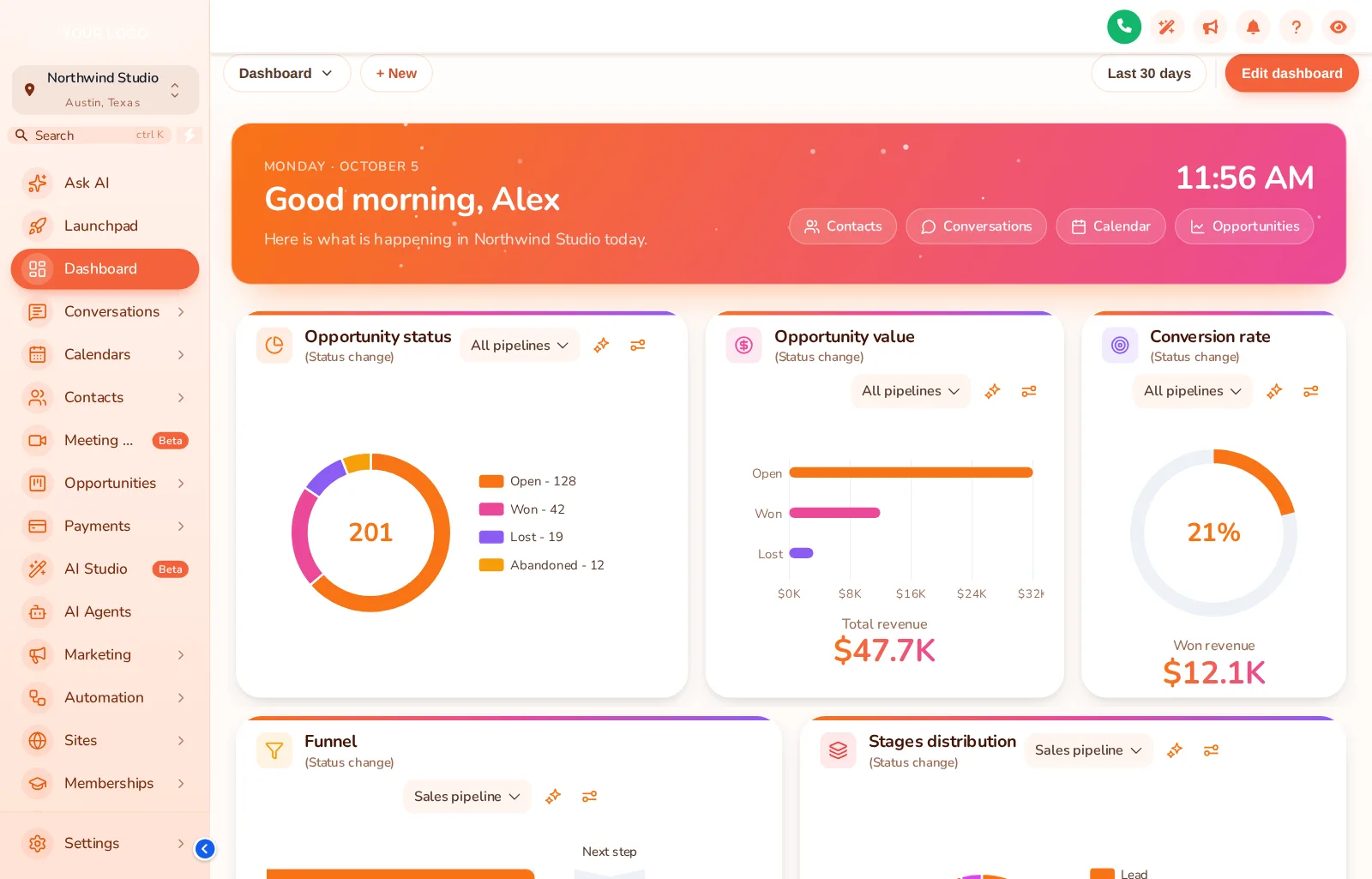
Sunset Warm, a welcome screen

GoHighLevel dashboard with the Sunset Warm design: cream canvas, warm gradient greeting hero and quick links
Sunset Warm, a dashboard design with a greeting hero. Captured from our own fitting-room preview.

Fitting room · dashboards

Every design, one click apart

Filter light, dark or photo, pick a design, then change the sidebar theme under it. The clock in the window is live.

Dressing the window…

Sunset Warm Each chip is a real dashboard design applied by the engine to a copy of the GoHighLevel dashboard. The clock is live; the quick links and chart colours belong to the design.

The full rail

All dashboard designs, by name

Grouped as the editor groups them. Each one sets the canvas, the greeting hero, quick links and chart colours.

  • Aurora Glass
  • Midnight Neon
  • Clean Bento
  • Sunset Warm
  • Ocean Pro
  • Emerald Finance
  • Obsidian Gold
  • Candy Pastel
  • Brand Match
  • Slate Minimal
  • Neo Brutal
  • Cyber Grid
  • Northern Lights
  • Pastel Sky
  • City Nights
  • Lagoon
  • Golden Hour
  • Liquid 3D

Answer first

What is GoHighLevel dashboard design?

GoHighLevel dashboard design

GoHighLevel dashboard design means restyling the sub-account dashboard — the first page after login — with a branded hero, greeting, quick links and chart colours. The GHL Customizer's dashboard designer has 18 designs and is included from Theme Bundle.

What it does for you

Why a dashboard earns its keep

  • A welcome that feels personal

    The hero greets each user by first name and location, so the platform feels built for them.

  • Fewer "where is…" emails

    Quick links on the dashboard put conversations, calendars and the pipeline one click away.

  • Seasonal or campaign looks

    Swap the dashboard design for a launch or a season without touching anything else.

Before and after

The first screen, off the rack and tailored

Off the rack

  • Clients land on a wall of default widgets
  • Nothing on the first screen says who they are working with
  • No obvious next click for a busy client

Tailored in the editor

  • A greeting with their name and the day’s context
  • Your brand on the hero, the canvas and the charts
  • Quick links to the four things they actually open

In the editor

Four aisles to a new dashboard

  1. Open the dashboard designer

    Filter by light, dark or photo and preview each design on a sample sub-account.

  2. Edit the greeting and quick links

    Choose the words, the links and the background image.

  3. Match it to your theme

    Chart and accent colours follow your brand, or set them by hand.

  4. Publish

    With the install line already in place, the new dashboard shows on the next page load.

On the tag

Dashboards start on shelf two

Dashboards come with Theme Bundle and All-Access.

Shelf 1

Theme Single

The theme shelf for one brand: every theme, UI kit and login design.

$149one-time · lifetime access

A solo agency or a single business that wants GoHighLevel to look like its own product this week.

Login emailed within minutes (max 24 hours)

Shelf 3

Theme Shop All-Access

The whole shop: themes, working parts and every website widget.

$779one-time · lifetime access

An agency selling GoHighLevel as its own branded platform, with websites and funnels that need to convert.

Login emailed within minutes (max 24 hours)

Prices in USD, paid once by card through our basket and Stripe. Each package is a self-serve account: you style and install it yourself, with help docs and support if you get stuck. All sales are final once the account is created (see the refund policy), so try every module in the fitting room first.

Dashboard questions

GoHighLevel dashboard questions

Can you customize the GoHighLevel dashboard?

Yes. The GHL Customizer’s dashboard designer restyles the sub-account dashboard with one of 18 designs: a hero greeting, live clock, quick links, background and chart colours. It is included from Theme Bundle.

Which package includes the dashboard designer?

Theme Bundle ($379) and Theme Shop All-Access ($779). Theme Single covers themes and login pages only.

Does the dashboard design change my GoHighLevel data or widgets?

No. It is a visual layer. Your widgets, reports and data stay exactly as GoHighLevel provides them; the design changes the canvas, hero, links and colours around them.

Can the greeting use the client’s name?

Yes. The hero supports placeholders such as the first name and the location name, so each user sees their own greeting.

Are there dark dashboard designs?

Yes. The designs are grouped light, dark and photo, and 6 of them use a full photo background. The live preview filters by group.

Can I use a different dashboard per sub-account?

Workspaces let you keep separate setups: Theme Bundle includes 2 workspaces and Theme Shop All-Access 3.

Does it work on a phone?

Yes. Switch the live preview to phone width to see how each design stacks on a small screen.

Do I have to reinstall after changing the dashboard?

No. The one-line install is done once; every later publish from the editor reaches GoHighLevel automatically.

GoHighLevel and HighLevel are trademarks of HighLevel, Inc. FunnelThemeShop is independent and is not affiliated with or endorsed by HighLevel. The GHL Customizer is a separate platform run by GHL Customer Care; your account is created on it when you buy here.

GHL Customizer accounts · self-serve

Greet every client by name

Theme Bundle adds all 18 dashboard designs to every theme and login page, for $379 once.

Compare the packages

Login emailed within minutes (max 24 hours) · one-time payment, lifetime access · no GoHighLevel password asked for, ever