Skip to content

Appearance

Accent palette

Shop the snapshots

Shelf 04 · Menus and navigation

A GoHighLevel custom menu that puts your aisles first

Navigation decides how fast your team gets anywhere. Move the menu to a top bar, collapse it to icons, open sub-pages as mega menus in 8 styles, restyle the header 8 ways, or float a quick menu over every page.

Stock sidebar
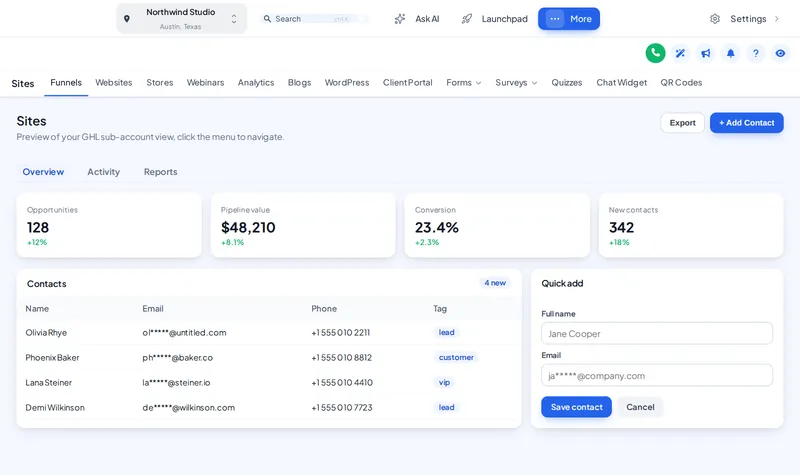
GoHighLevel with a top-bar layout: navigation across the top and the Sites section sub-pages as tabs below itTop bar, your order

Answer first

What is a GoHighLevel custom menu?

GoHighLevel custom menu

A GoHighLevel custom menu changes where and how the app's navigation appears: left or right sidebar, top bar, collapsed icons, mega menus for sections with sub-pages, and a floating quick menu. Sidebar or top-bar layout is in every GHL Customizer package; mega menus and the floating menu come with Theme Bundle.

mega menu styles
0
top bar styles
0
header styles
0

Fitting room · layouts

Move the menu, open the aisles

Start on the top bar, then try the sidebars, collapsed icons, mega sub-menus and header styles. Click around inside the window.

From Theme Bundle

A floating quick menu on every page

A bubble, dock or rail holding the pages your team opens most, in 8 designs. Drag it anywhere on the screen.

Dressing the window…

Dock bar The quick menu floats over every page. Open the bubble, hover the dock or rail, and drag it by its grip.

Before and after

Navigation, off the rack and tailored

Off the rack

  • A long sidebar of items nobody on the team uses
  • Sub-pages hidden behind extra clicks
  • Every agency’s GoHighLevel navigates identically

Tailored in the editor

  • A top bar or a trimmed sidebar in your order
  • Mega menus that show a section’s pages at a glance
  • A floating quick menu for the four pages people live on

Who it helps

Faster for everyone who logs in

  • Faster for power users

    Collapsed icons and a quick menu give setters and closers their pages without hunting.

  • A layout that reads as a product

    A top-bar layout alone makes GoHighLevel look like a different app.

  • Sections that make sense

    Mega menus lay out Payments, Sites and Marketing so clients find the page they want first time.

In the editor

Four aisles to your own navigation

  1. Pick a layout

    Left sidebar, right sidebar, top bar, merged header or collapsed icons.

  2. Choose sub-menu and header styles

    A normal list or one of 8 mega styles; one of 8 header styles.

  3. Add the floating quick menu

    A bubble, dock or rail in 8 designs, with the pages you choose.

  4. Publish

    The navigation changes on the next page load inside GoHighLevel.

On the tag

Layouts on every shelf, mega menus from two

Menus: layouts and colours are in every package; mega menus and the floating quick menu start with Theme Bundle.

Shelf 1

Theme Single

The theme shelf for one brand: every theme, UI kit and login design.

$149one-time · lifetime access

A solo agency or a single business that wants GoHighLevel to look like its own product this week.

Login emailed within minutes (max 24 hours)

Shelf 3

Theme Shop All-Access

The whole shop: themes, working parts and every website widget.

$779one-time · lifetime access

An agency selling GoHighLevel as its own branded platform, with websites and funnels that need to convert.

Login emailed within minutes (max 24 hours)

Prices in USD, paid once by card through our basket and Stripe. Each package is a self-serve account: you style and install it yourself, with help docs and support if you get stuck. All sales are final once the account is created (see the refund policy), so try every module in the fitting room first.

Menu questions

GoHighLevel menu questions

Can I change the GoHighLevel sidebar menu?

Yes. The customizer can move it to the right, turn it into a top bar, merge it with the header or collapse it to icons, and restyle every item. Layout and colours are in every package.

What is a mega menu in GoHighLevel?

A panel that opens from a menu section and shows all its sub-pages at once, instead of a nested list. There are 8 mega menu styles; they come with Theme Bundle and above.

Which package includes mega menus and the floating menu?

Theme Bundle ($379) and Theme Shop All-Access. Theme Single includes the sidebar or top-bar layout, colours and logo.

What is the floating quick menu?

A small menu that floats over every page — a bubble, a dock or a rail, in 8 designs — holding the pages your team opens most. It can be dragged anywhere on screen.

Can I hide menu items my clients do not need?

The customizer restyles and reorganises navigation; what each user can access is still controlled by GoHighLevel’s own user permissions, which remain the right place to restrict access.

Does a top-bar layout work on small laptops?

Yes. Try the top bar in the live preview at desktop and phone width; the layout adapts and sections still open their sub-pages.

Will my team need retraining?

Rarely. The same pages exist with the same names; they are just easier to reach. Most teams adjust in a morning.

Do menu changes need a reinstall?

No. Install once; later changes are published from the editor.

GoHighLevel and HighLevel are trademarks of HighLevel, Inc. FunnelThemeShop is independent and is not affiliated with or endorsed by HighLevel. The GHL Customizer is a separate platform run by GHL Customer Care; your account is created on it when you buy here.

GHL Customizer accounts · self-serve

Put your pages first

Theme Bundle unlocks mega menus, the floating quick menu and the header styles, on top of every theme, for $379 once.

Compare the packages

Login emailed within minutes (max 24 hours) · one-time payment, lifetime access · no GoHighLevel password asked for, ever